
Clipcroft icon
Clipcroft icon

Clipcroft

Browser-based shared clipboard for sending text, links, and files between devices, even on different networks. Works in real time, with no account, install, or file size limits.
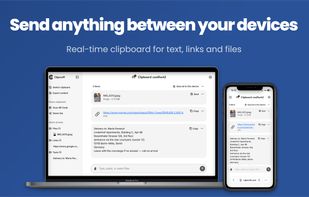
Clipcroft on a laptop and a phone: text, links, and files shared in real time between them.

Cost / License

  • Free
  • Proprietary

Platforms

  • Online
0likes
0articles

Features

Properties

  1.  Privacy focused

Features

  1.  Dark Mode
  2.  No registration required
  3.  End-to-End Encryption
  4.  Secure File Sharing
  5.  Drag and Drop
  6.  File Sending
  7.  Support for Large Files
  8.  Multi Device Support
  9.  Multiple languages
  10.  Cross-Platform
  11.  Peer-To-Peer
  12.  Online file transfer
  13.  Browser-based
  14.  WebRTC
  15.  Large File Transfer

Clipcroft News & Activities

Highlights All activities

Recent activities

Clipcroft information

AlternativeTo Categories

File SharingSecurity & Privacy
Clipcroft was added to AlternativeTo by Víctor Camacho on and this page was last updated .
No comments or reviews, maybe you want to be first?

What is Clipcroft?

Clipcroft is a real-time shared clipboard for sending text, links, and files between devices, entirely in the browser. A clipboard created on one device opens on any other by entering its name. There is no installation required and no account to create.

Key features:

  • No account, no install: open the site and start sharing.
  • Unlimited file size and count: no per-file, per-day, or per-month caps, and no limit on how many files you can send.
  • Works on any network: devices do not need to be on the same Wi-Fi.
  • No cloud: files are streamed browser-to-browser and are never stored on any server.
  • Multi-device: multiple devices can join one clipboard.
  • Cross-platform: any modern browser on Windows, Mac, Linux, Chrome OS, iPhone, iPad, and Android.
  • Dark mode: light, dark, or match your system.
  • Languages: English and Spanish.

Clipcroft is free to use.

Files are always encrypted in transit with WebRTC's built-in DTLS encryption. Text is relayed by Clipcroft's server in real time and discarded as soon as it is delivered. Setting a password on a clipboard adds end-to-end encryption on top: everything is encrypted in the browser before it is sent and stays encrypted on each device.

Transfers are fastest when both devices are on the same network: files go directly from one to the other at local network speed, without touching the internet.

