
Clover icon
Clover icon

Clover

Wings for your Windows Explorer!

Clover is an extension of the Windows Explorer, to add multi-tab functionality similar to Google Chrome browser. After Clover is installed, you will be able to open multiple folders in tabs within the same window, and you can also be able to add.
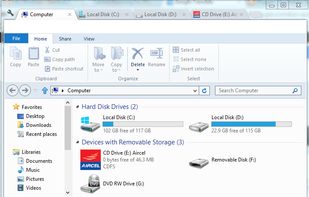
Entire app window

Cost / License

  • Free
  • Proprietary

Application type

Alerts

  • Bundleware
  • Discontinued

Platforms

  • Windows  Windows XP, Windows Vista, Windows 7/8/10
  • Windows Explorer
Bundleware

Since version 3.1.0, the program contains adwares, as reported on Reddit and VirusTotal. https://www.reddit.com/r/Windows10/comments/4uqswo/new_version_of_clover_out_310_tabbed_windows/d96tkpy/

Discontinued

Last update (Clover Beta 3.5.4) on April 14, 2020: http://en.ejie.me/blog.html

238likes
0articles

Features

  1.  Tabbed interface
  2.  Multiple Browser Tabs
  3.  Tabbed browsing
  4. File Explorer icon  Windows Explorer Extension
  5.  GUI Designer
  6.  Tab Stacking
  7.  IT Asset Management
  8.  Chrome-like
  9.  Bookmarks
  10.  Windows-explorer

Clover News & Activities

Highlights All activities

Recent News

No news, maybe you know any news worth sharing?
Share a News Tip

Recent activities

Comments and Reviews

   
Comment summary: Clover provides aesthetic, Chrome-style tab browsing for Windows File Explorer, with positive feedback on its simplicity and utility. However, users report frequent crashes and stability issues, especially on Windows 10. Concerns about adware and data collection have arisen, particularly with newer versions introducing a VIP option and connections to Chinese servers. While it offers useful features like middle-mouse-button tab management, users have faced uninstallation challenges and consider alternatives like QTTabBar.
Top Positive Comment
dinosw
0

If you prefer to use Windows File Explorer, but at the same time find that you are in dire need of tabs, then Clover is probably your best choice. Some people around the web say that Clover contains malware, which it doesn't. It does however (as already mentioned) contain bundleware, so make sure to pay attention when installing Clover (I'd recommend installing Unchecky as it automatically un-clicks offers in installers).

[Edited by dinosw, October 08]

Top Negative Comment
Lehuga ntaps
1

Completely garbage app, it connects to Chinese server right away and not just one but 7 servers It'll collect your data and tampered windows system Trust me, it's not worth it

anti_canada_ranger
0

Used it extensively on Win7. Simple with a UI that matches instead of looking fossil-adjacent, numerous settings with a bit of configurability. Was sometime in 2014 when it changed hands and the updater became mandarin and started to make connections to servers overseas.

Guest
2

I used Clover for years but had to uninstall because of the adware now. Plus all uninstall instructions are not in English. I'll find something better without spam and adware.

Review from a new or low-activity account — shown here, but not counted in the app rating.
Guest
1

Easy and simple. The best part is it always integrate new window to a existing tab which I QTTaBar can't

Review from a new or low-activity account — shown here, but not counted in the app rating.
RemovedUser
0

really love clover the tabs are amazing

Review from a new or low-activity account — shown here, but not counted in the app rating.
Clemens_Ratte_Polle
2

WARNING! Not possible to uninstall Clover!! :( Windows Explorer will be replaced with no request! >:( My solution to get rid of Clover: Download systemexplorer.net: Uninstall the "Clover Tab Explorer" as BHO Browser Helper Object: Search for Clover under autoruns. Also with Autoruns by Sysinternals and Glary Utilities.

7 of 36 comments

Featured in Lists

As Windows users, sometimes we miss some basic native macOS features. Here are some alternatives to improve your OS...

List by Mauricio B. Holguin with 9 apps, updated

A list with 328 apps by christineconnor without a description.

List by christineconnor with 328 apps, updated

Some of the android apps that I use which are either under GNU GPL licences or is respecting users privacy

List by RemovedUser with 34 apps, updated

What is Clover?

Wings for your Windows Explorer!

Clover is an extension of the Windows Explorer, to add multi-tab functionality similar to Google Chrome browser. After Clover is installed, you will be able to open multiple folders in tabs within the same window, and you can also be able to add folder bookmarks.

Note: If you're starting Clover with a bunch of previously opened tabs, so don't be hurry for some first seconds 'cause it can freeze. Also be aware to delete some files if you use Ctrl-D hothey for bookmarking a folder 'coz the same hotkey you can set for deleting without prompt if you unchecked "Show recycle confirmation" in Explorer (or Shift-Del).

Malware Warning Information: Exercise due diligence, but understand that the required behaviour of this application will trigger some anti-malware engines which look for suspicious behavior, such as tampering with Windows Explorer. You may see warnings on this site or from your own software. Review them, but watch for 'trojan.generic' or 'gen.trojan.heuristic' types of identifiers from antivirus engines, which denote that the file does not necessarily contain identifiable harmful code, but exhibits a potentially unwanted behaviour, which is expected and desirable in most cases. Understand however, that this doesn't mean this download cannot become unsafe, infected with real malware, like other software, so read the warnings from your scanning engines to be sure.

Clover information

AlternativeTo Categories

File ManagementWeb Browsers

Our users have written 36 comments and reviews about Clover, and it has gotten 238 likes

Clover was added to AlternativeTo by User5234829 on and this page was last updated .
