While Microsoft Defender has evolved over the years into a robust, powerful and effective antivirus product, the
User Interface continues to be frustratingly difficult to access and configure for most end-users.
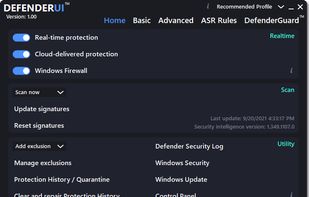
DefenderUl was created to provide a user-friendly and efficient User Interface for Microsoft Defender and to also
unlock the hidden Microsoft Defender security features that are otherwise unavailable to the end-user in Windows
Security Settings.
While most DefenderUl features function out of the box, there are a handful that do not function while Microsoft
Defender Tamper Protection is enabled. These features include Real-time Protection, Behavior Monitoring, Scan all
downloaded files and attachments, Script scanning and Threat Default Actions.
DefenderUl provides direct links to equivalent features in Windows Security Settings for most features that are
unavailable while Tamper Protection is enabled. For example, while Tamper Protection is enabled, the DefenderUl
Real-time Protection toggle button is disabled. However, the user is able to click the DefenderUl Real-time
Protection label to directly access Real-time Protection setting in Windows Security Settings.
-
ASR Rules: This feature enables access to the Attack Surface Reduction rules provided by Microsoft Defender
Exploit Guard, which are unavailable in the default factory Windows Security Settings.
-
Audit Mode: This audit mode to evaluate how attack surface reduction rules would affect your organization if
enabled. Run all rules in audit mode first so you can understand how they affect your line-of-business applications.
Many line-of-business applications are written with limited security concerns, and they might perform tasks in ways
that seem similar to malware.By monitoring audit data and adding exclusions for necessary applications, you can
deploy attack surface reduction rules without reducing productivity.
- Warn Mode: Whenever content is blocked by an attack surface reduction rule, users see a dialog box that
indicates the content is blocked. The dialog box also offers the user an option to unblock the content. The user can
then retry their action, and the operation completes. When a user unblocks content, the content remains unblocked
for 24 hours, and then blocking resumes.
To keep DefenderUI as simple and minimalistic as possible, the DefendeUI Information "i" elements only contain
necessary, non-obvious information.




 VoodooSoft
Comments and Reviews
I'll prefer Hard_Configurator and ConfigureDefender.. But great free app also.
alternative UI for Windows Security - Virus and threat protection module, with extra knobs.