Tired of squinting at "Desktop 1," "Desktop 2," "Desktop 3" and never knowing which is which? macOS still will not let you name your Spaces. DesktopTitle fixes that.
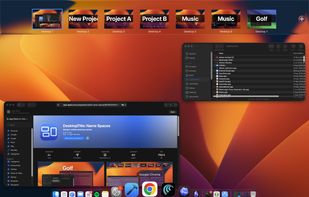
DesktopTitle puts a clean, editable name label right on each virtual desktop - and keeps it always on top, so you can tell at a glance whether you are in Work, Personal, Design, or Code. Unlike menu-bar-only tools, the name lives on the desktop itself, exactly where you are already looking.
WHY DESKTOPTITLE
- Always-visible labels: the desktop's name floats on screen, never hidden in the menu bar.
- One-click rename: click the label, type the name, done.
- Built for many Spaces: made for power users who juggle a lot of desktops.
- Works on Apple Silicon: native and fast, and it does not require disabling SIP.
- Private by design: sandboxed, no tracking, no account. Your desktop names never leave your Mac; the only network use is Apple's own In-App Purchase.
- Make it yours: adjust size, position, and opacity per screen.
FREE TO START
Use DesktopTitle free for up to 3 desktops. When you need more, a single in-app purchase of EUR 4.90 unlocks unlimited desktops and the power features - one time, no subscription, ever.
WHO IT IS FOR
If you run 4, 6, or 10+ Spaces across work and life, DesktopTitle keeps you oriented. If you only ever use a single desktop, you probably do not need it - and that is fine.
WHAT MACOS STILL CONTROLS
macOS keeps calling them "Desktop 1, 2, 3" in Mission Control's top bar - that bar belongs to Apple and no App Store app can change it. What DesktopTitle changes is what you look at all day: the name you chose, on the desktop itself, always on top.
IF YOUR OLD SPACE RENAMER STOPPED WORKING
If your old Space-renaming tool broke on Apple Silicon or after a macOS update, DesktopTitle is a clean, native alternative that keeps working - no hacks, no SIP changes, no system tweaks.
Download free and name your first three desktops in seconds.








 PixelSolution added DesktopTitle as alternative to StayHere, FlashSpace, Workspace Manager and AirSpace

