Directory Compare Alternatives

Directory Compare is described as 'Utility to help you keeping copies of your important directories (documents, programs under development and so on) in a backup hard disk or any other storage system (like USB drives or CD-RW disks)' and is a File Sync tool in the backup & sync category. There are more than 10 alternatives to Directory Compare for a variety of platforms, including Windows, Mac, Linux, Android and Android Tablet apps. The best Directory Compare alternative is FreeFileSync, which is both free and Open Source. Other great apps like Directory Compare are rsync, GoodSync, SyncToy and DirSync Pro.

Copy a direct link to this comment to your clipboard
Directory Compare alternatives page was last updated

Alternatives list

  1. PureSync icon
     18 likes

    PureSync is a professional file backup and synchronization software, that can automatically keep a backup of your important files, import files from your digital camera and synchronize the contents of multiple folders, but not from "Windows Mobile" devices and no...

    71 PureSync alternatives

    Cost / License

    • Free Personal
    • Proprietary

    Application type

    Platforms

    • Windows
     
  2. @MAX SyncUp icon
     7 likes

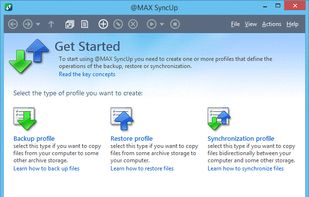
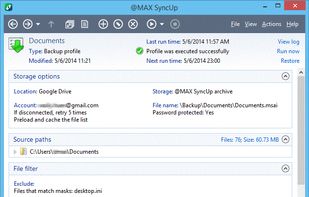
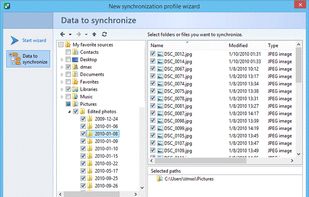
    @MAX SyncUp is a feature-rich utility for backing up and synchronizing data on a local network or over the Internet. @MAX SyncUp provides an Apple Time Machine style backup using hard links. It allows for the effective remote synchronizing through an RSync-like algorithm to...

    Cost / License

    • Free Personal
    • Proprietary

    Application type

    Platforms

    • Windows
     
  3. Sync Folders icon
     2 likes

    The Sync Folders Pro synchronizes any number of folders on the fly at the same time when there are changes, or connecting external drives at a set time or manually. The app sync folders with or without filter for folder names and / or file names.?

    54 Sync Folders alternatives

    Cost / License

    • Freemium
    • Proprietary

    Platforms

    • Mac
     
  4. A graphical user interface for rsync, which looks-and-feels like a standard FTP client, but uses the rsync protocol ‘under the hood’ to boost transfer speeds.

    Cost / License

    • Paid
    • Proprietary

    Platforms

    • Mac
     
  5.  4 likes

    cwRsync is a yet another packaging of rsync and Cygwin for Windows. You can use cwRsync for fast remote file backup and synchronization. Rsync uses the rsync algorithm which provides a very fast method for bringing remote files into sync.

    Cost / License

    • Paid
    • Proprietary

    Application type

    Platforms

    • Windows
     
  6. FolderClone icon
     1 like

    FolderClone lets you make an identical copy of a folder from one drive to another. It can copy files between a desktop computer and a laptop, or replicate data between a workstation and a server, or backup to a cloud storage provider.

    Cost / License

    • Paid
    • Proprietary

    Platforms

    • Windows
     
  7. Backup, synchronization and archiving for Windows 7 and 8.

    Cost / License

    • Paid
    • Proprietary

    Platforms

    • Windows
     
  8.  2 likes

    Lsyncd watches a local directory trees event monitor interface (inotify or fsevents). It aggregates and combines events for a few seconds and then spawns one (or more) process(es) to synchronize the changes. By default this is rsync.

    Cost / License

    • Free
    • Open Source

    Platforms

    • Mac
    • Windows
    • Linux
     
  9. MacDropAny icon
     1 like

    MacDropAny is a simple app that painlessly allows Mac users to sync any folder on their computer through Dropbox. It provides similar functionality to DropboxFolderSync, which is an application for Windows. MacDropAny is compatible with Snow Leopard and Lion (from version 1.

    Cost / License

    • Free
    • Proprietary

    Application type

    Platforms

    • Mac
     
  10. WinDataReflector is a lightweight file synchronization and backup tool that wraps up fast file comparison and transfer algorithms into a simple and clear interface that offers you visual comparison of files and folders.

    Cost / License

    • Freemium
    • Proprietary

    Application type

    Platforms

    • Windows
     
  11. Organyze SYNC, a Windows application for desktops and laptops, takes care of the headache of keeping files updated in all locations in today’s fast moving world, where we use multiple computers and devices for work, social activity and fun.

    Cost / License

    • Paid
    • Proprietary

    Application type

    Platforms

    • Windows
     
You are at page 2 of Directory Compare alternatives