Disk Bench icon
Disk Bench icon

Disk Bench

I want to know how fast are my disks really are, in a real life situations. Not in a synthetic benchmarking program that will display figures that I will never be able to meet.
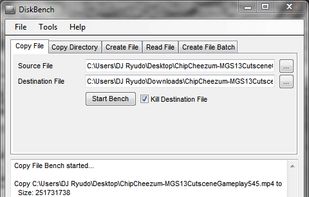
An example of the 'Copy File' test.  This test was done with a MP4 video that is 204MB in size.  Note that you can tell Disk Bench to delete the copyed file once the test is finished.

Cost / License

  • Free
  • Proprietary

Application type

Alerts

  • Discontinued

Platforms

  • Windows  Disk Bench requires you to have Microsoft's .Net Framework 4.0!
Discontinued

The latest version (2.8.0.1) is from September 2020.

2likes
0articles

Features

  1.  Portable
  2.  Benchmark

Disk Bench News & Activities

Highlights All activities

Recent activities

Disk Bench information

Disk Bench was added to AlternativeTo by djryudo on and this page was last updated .
No comments or reviews, maybe you want to be first?

What is Disk Bench?

I want to know how fast are my disks really are, in a real life situations. Not in a synthetic benchmarking program that will display figures that I will never be able to meet.

The program is using the current filesystem to save a file. If it is fragmented, the performance will be degraded, as it is in real life.

So, to figure out how fast your computer is, you can copy a file from A to B and use a stop watch. Or you could just as easy use this program.

All it does is:

  1. copies a file from A to B, times the time it took, and deletes the file from B again.
  • or -
  1. The other way to benchmark is to choose Create File. This way it just creates a file (consisting of a repeated 128 byte string). So if you only have one harddisk, this is the optimal test for you.