
Djobar
Djobar restores the customizable desktop toolbar that Windows 11 removed : Drag any app, file, folder or web link onto a lightweight always-visible bar - your shortcuts always one click away. Free, portable, signed, 48 languages, no telemetry.
Cost / License
- Freemium (Pay once)
- Proprietary
Application types
Platforms
- Windows
Features
Properties
- Privacy focused
- Support for Themes
- Lightweight
- Customizable
Features
- Ad-free
- Works Offline
- Portable
- No Tracking
- No registration required
- No Telemetry
- Application Launchers
- Launcher
- Custom shortcuts
- Multiple languages
- Bookmarks
- Drag and Drop
Djobar News & Activities
Recent activities
- NicoDez added Djobar
NicoDez added Djobar as alternative to RocketDock, Winstep Nexus, Docking and ObjectDock
Djobar information
What is Djobar?
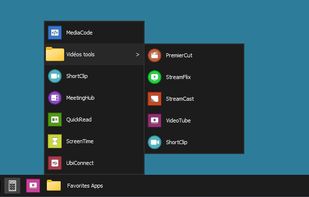
Djobar is a lightweight desktop shortcut bar for Windows 10 and Windows 11 that brings back the customizable toolbar feature Microsoft removed in Windows 11. Built as a native Windows AppBar - the same mechanism the Windows taskbar uses - Djobar reserves its own space at the edge of your screen so your applications never overlap with it.
-
Drag, drop, click : Drag any application from the Start Menu, any file or folder from File Explorer, or any bookmark from Chrome, Firefox, Edge, Opera, Vivaldi or Brave directly onto the bar. Each item becomes a clickable icon. Reorder them by drag & drop. Group them into folders with cascading submenus.
-
Browser bookmarks at one click : Hover or click on a browser icon to instantly access its full bookmark tree - no more opening the browser just to find a link.
-
Multi-bar mode (Pro) : Organize shortcuts across themed bars (Work, Personal, Gaming…) and switch between them via a dedicated selector.
-
Power-user friendly : Single config.ini file, fully editable. Auto-monitors the shortcuts folder and refreshes in real time. Hides and shows in sync with the Windows taskbar's auto-hide setting. Global keyboard shortcut to toggle visibility (configurable). Supports DPI scaling, multi-monitor, and any screen resolution.
-
Privacy first : No telemetry, no tracking, no analytics. The only network calls are license validation (Pro) and update checks. All shortcuts are stored as plain .lnk and .url files, fully portable across PCs.
-
48 languages : Djobar's interface is available in 48 languages including English, French, German, Spanish, Italian, Portuguese, Dutch, Polish, Russian, Japanese, Korean, Chinese, Arabic and many more.
-
Pricing : Free up to 25 shortcuts (no time limit). Djobar Pro is €9.99 one-time, activatable on up to 3 computers, no subscription. A free 30-day trial of Pro is available.
-
Compatible with Windows 10 and Windows 11 (32 & 64-bit).


