DualScroll icon
DualScroll icon

DualScroll

Dual-language teleprompter for iPhone, iPad and Mac: two scripts scroll side by side in lockstep, for second languages, translations and cues.
DualScroll screenshot 1
DualScroll screenshot 2
+11
DualScroll screenshot 3

Cost / License

  • Freemium
  • Proprietary

Application type

Platforms

  • Mac
  • iPhone
  • iPad
0likes
0articles
Save

Features

Properties

  1.  Privacy focused

Features

  1.  Record videos

DualScroll News & Activities

Highlights All activities

Recent activities

DualScroll information

  • Developed by

    Telepromptme Studios
  • Licensing

    Proprietary and Freemium product.
  • Pricing

    free version with limited functionality.
  • Alternatives

    10 alternatives listed
  • Badge

    Get an embeddable badge for DualScroll
  • Supported Languages

    • English
DualScroll was added to AlternativeTo by Telepromptme on and this page was last updated .

No comments or reviews, maybe you want to be first?

Official Links

What is DualScroll?

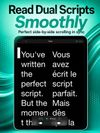
DualScroll is a teleprompter that scrolls two scripts side by side, in lockstep. Put the language you are reading in one column and a translation, a transliteration or your notes in the other, and both move together as you read. It is built for people who present in a second language, for interpreters and dubbing, for bilingual broadcasts, and for anyone who wants cues or stage directions next to the words without them being read out.

What it does:

  • Two scripts, scrolling together: pair a language with its translation, phonetics or cues
  • Smooth scrolling at a speed you set, or paced to finish in an exact time
  • Records video up to 4K while you read, with the scripts beside the camera
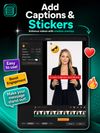
  • Automatic captions burned into the recording
  • Background removal without a green screen, plus live filters
  • Mirror text and screen for beam-splitter rigs; duplicate windows on an external display (Mac)
  • A transparent overlay that floats the scripts over Zoom, Teams and Meet (Mac)
  • Remote control from a second device or a hardware clicker
  • Import PDF, RTF and TXT scripts; iCloud sync across iPhone, iPad and Mac
  • Script queues, looping and a studio video editor

Private by design: no account, and scripts and recordings stay on your device or in your own iCloud. Free to try, and one purchase covers iPhone, iPad and Mac.