EC2 Auto Scheduler for AWS icon

EC2 Auto Scheduler for AWS

A lightweight Windows desktop app that helps you save money by starting and stopping Amazon EC2 instances on a daily schedule.
EC2 Auto Scheduler for AWS screenshot 1

Cost / License

  • Pay once
  • Proprietary

Platforms

  • Windows
EC2 Auto Scheduler for AWS screenshot 1
Alternatives
0likes
0alternatives
0articles

Features

No features, maybe you want to suggest one?

EC2 Auto Scheduler for AWS News & Activities

Highlights All activities

Recent activities

No activities found.

EC2 Auto Scheduler for AWS information

EC2 Auto Scheduler for AWS was added to AlternativeTo by EcoCloudTools on and this page was last updated .
No comments or reviews, maybe you want to be first?

What is EC2 Auto Scheduler for AWS?

What it does

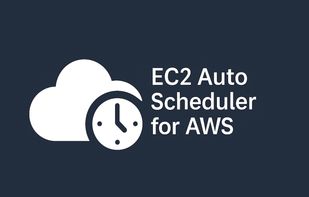
  • Pick one or more EC2 instances and assign one daily start/stop schedule per server.

  • Choose times in your local timezone (UTC also shown).

  • Stores logs locally for transparency.

  • Creates AWS-native automation (EventBridge + Lambda) so schedules keep running even when your PC is off.

Why it exists

Manually stopping servers is easy to forget. This tool ensures you stop paying for idle instances.

What you get

  • QuickStart PDF (step-by-step setup guide)

  • MSI installer download (via Gumroad)

  • Local logging

  • Email support: support@ecocloudtools.freshdesk.com

Requirements

  • Windows 10/11

  • AWS account with permissions to:

  • Start/Stop EC2 instances you choose

  • Create EventBridge rules + Lambda