
FixMyExport icon
FixMyExport icon

FixMyExport

FixMyExport processes Snapchat My Data exports on your device. It restores supported capture dates, time, and GPS, can merge paired overlays, and can stitch supported split videos. Photos and videos are never sent to FixMyExport.
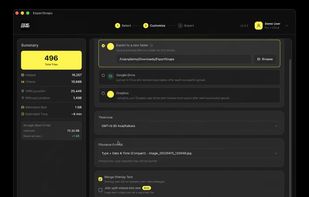
PREVIEW

Cost / License

  • Freemium (Pay once)
  • Proprietary

Platforms

  • Mac
  • Windows
  • Android
  • iPhone
0likes
0articles

FixMyExport News & Activities

Highlights All activities

Recent activities

FixMyExport information

  • Developed by

    IN flagKazi Hasan Ali
  • Licensing

    Proprietary and Freemium product.
  • Pricing

    One time purchase (perpetual license) ranging between $15 and $20 + free version with limited functionality.
  • Alternatives

    1 alternatives listed
  • Badge

    Get an embeddable badge for FixMyExport
  • Supported Languages

    • English

AlternativeTo Category

Photos & Graphics

Popular alternatives

View all
FixMyExport was added to AlternativeTo by Exportsnaps on and this page was last updated .
No comments or reviews, maybe you want to be first?

Official Links

What is FixMyExport?

FixMyExport processes Snapchat My Data exports and restores supported capture dates, time information, and GPS coordinates. It can also merge paired overlay assets and stitch supported video segments.

Processing happens on your device. Snapchat photos, videos, and My Data are never uploaded to FixMyExport servers. For a local export, finished files go to the folder you choose. For connected Google Drive or Dropbox, the app on your device sends finished files to your own account.

Supported platforms: macOS 12.0+, Windows 10 1809+, iPhone and iPad (iOS/iPadOS 15.1+), and Android 7.0+.

You select the extracted primary My Data folder (the one that contains json and memories). The app matches media with Snapchat’s JSON metadata and writes supported dates, GPS, and timezone-adjusted timestamps where the format allows (JPEG images; MP4/MOV videos). Overlay merging is optional. Joining split videos is an optional Beta setting and is not guaranteed for every clip.

Free: up to 200 files per export and up to three export attempts on a device. Pro is a one-time purchase for unlimited local processing on one device. Cloud export to iCloud, OneDrive, Dropbox, or Google Drive folders, and connected Drive/Dropbox upload, needs Cloud access (or the free limits). Export Snaps is the previous name of the same product.
