
Extension Manager icon

Extension Manager

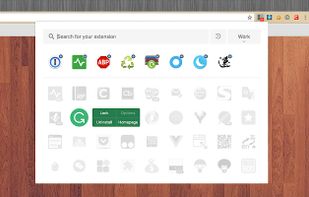
Manage extensions, Quickly enable/disable, Support batching operation, Smart sorting. Fast, Simple and Secure.
Extension Manager screenshot 1

Cost / License

  • Free
  • Proprietary

Platforms

  • Google Chrome
2likes
0articles

Features

No features, maybe you want to suggest one?

Extension Manager News & Activities

Highlights All activities

Recent activities

No activities found.

Extension Manager information

AlternativeTo Category

Web Browsers
Extension Manager was added to AlternativeTo by kaekazeh on and this page was last updated .
No comments or reviews, maybe you want to be first?

What is Extension Manager?

Manage extensions, Quickly enable/disable, Support batching operation, Smart sorting. Fast, Simple and Secure.

  1. One Key fast enable/disable extension
  2. Lightning Group: Quickly enable/disable extension groups according to the scene (except for locked or theme class extensions)
  3. Smart Sort: intelligent sorting according to your frequency of use (default sort by name)
  4. Right-click Menu: provides shortcut functions such as lock, uninstall, option configuration, home page, APP running, etc.
  5. Smart Search: Quickly find the extension you need with keywords or phrases
  6. Reminder: display the extended status in real time, remind reset after use, reduce resource consumption (except for locked or theme class extension)
  7. View Selection: Provide list view and grid view, in line with user habits
  8. Group management: general group and fixed group, flexible management
  9. Extension Naming: Give your extension an alias you like
  10. Automatic matching: You can turn extensions on and off according to different websites