The ultimate productivity companion for Windows.
FocusGuard Pro combines a powerful distraction blocker, a Pomodoro-style timer, and deep analytics into a stunning, modern interface featuring the Windows Acrylic (Glass) aesthetic.
Version Platform License Python
📥 Download & Installation
Simply download the installer:
Go to the Releases Page.
Download the latest file: FocusGuard_Pro_Setup_v11.6.exe.
Run the installer and follow the on-screen instructions.
FocusGuard Pro will launch automatically and minimize to your system tray.
🖼? Screenshots
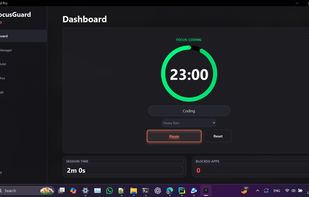
Dashboard
Track your current session, manage focus/break timers, and control ambient sounds. Dashboard
App Manager
Selectively block distracting applications with custom profiles. App Blocking
Analytics
Visualize your productivity streaks and history over the last 7 days. Analytics
? Key Features
🚀 Productivity Engine
Smart Focus Timer: A stunning circular timer supporting Focus and Break intervals.
Task Intent: Log exactly what you are working on before every session.
Mini Mode: A compact, always-on-top overlay to keep you aware of the time without cluttering your screen.
🚫 Advanced App Blocking
Profile Management: Create blocking profiles (e.g., "Deep Work", "Light Study") with specific app blocklists.
Strict Mode: Optionally force-kill distracting processes instead of just minimizing them.
Smart Detection: Automatically detects running windows and installed apps for easy selection.
📊 Analytics & History
Interactive Charts: View your focus performance over the last 7 days.
Session Logs: Detailed history of every session, including task names and duration.
KPIs: Track your daily focus time, streaks, and total distractions blocked.
🎨 Modern UI/UX
Glass/Acrylic Effect: Native Windows background blur integration.
Theme Engine: Switch between Ambient and Dark modes.
Customization: Choose from 6 neon accent colors and 3 button styles (Gradient, Solid, Glass).
🎵 Ambient Soundscapes
Built-in audio engine playing Rain, Jungle, and Thunder sounds.
Support for uploading your own custom background music.
?? Configuration
FocusGuard Pro saves your preferences locally.
System Tray: The app minimizes to the system tray. Double-click the tray icon to restore the window, or right-click to Quit.
Auto-Start: You can enable "Run on Startup" in the Settings tab.
👨?💻 For Developers (Run from Source)
If you want to contribute or run the raw Python version, follow these steps:
Prerequisites
Windows 10 or 11.
📖 Download User Manual (PDF)
Includes installation guide, troubleshooting tips, and strict mode details.
🤝 Contributing
Contributions are welcome!
Fork the repository.
Create a new branch (git checkout -b feature/NewFeature).
Commit your changes.
Push to the branch and open a Pull Request.
👨?💻 Author
Md. Mustafijur Rahman Ratul
This project is for educational and productivity purposes.







 MustafijRatul added FocusGuard Pro as alternative to SelfControl, Cold Turkey, StayFocusd and Mindful : Focus & Screen Time
 GravitonX-Labs

