
Folders File Manager icon

Folders File Manager

Folders File Manager is designed for users who recently transitioned from a PC as well as for those who have always missed a tree-style file manager on their Mac. Everything in Folders feels as familiar as possible while satisfying your passion for beautiful-looking apps.
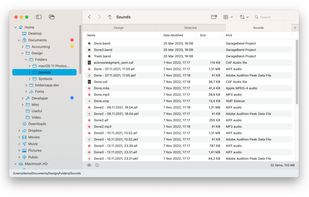
Folders File Manager screenshot 1

Cost / License

  • Pay once
  • Proprietary

Application type

Platforms

  • Mac  Works on macOS 13.0+
2likes
0articles

Features

Properties

  1.  Lightweight
  2.  Privacy focused

Features

  1.  Supports Zip files
  2.  Built-in viewer
  3.  Dark Mode
  4.  Batch Rename Files
  5.  Works Offline
  6.  Ad-free
  7.  File Tagging
  8.  No registration required
  9.  No Tracking
  10.  Cloud Sync
  11.  Tree view
  12.  Explorer-like
  13.  Multi-tabs
  14.  Folder Hierarchy
  15.  Thumbnails
  16.  Image Preview
  17.  File preview

Folders File Manager News & Activities

Highlights All activities

Recent News

No news, maybe you know any news worth sharing?
Share a News Tip

Recent activities

Folders File Manager information

  • Developed by

    UA flagAndriy Konstantynov
  • Licensing

    Proprietary and Commercial product.
  • Pricing

    One time purchase (perpetual license) ranging between $12 and $15.
  • Alternatives

    20 alternatives listed
  • Badge

    Get an embeddable badge for Folders File Manager
  • Supported Languages

    • English
    • Arabic
    • Bulgarian
    • Catalan; Valencian
    • Croatian
    • Chinese
    • Czech
    • Dutch
    • Danish
    • Finnish
    • French
    • German
    • Greek
    • Hebrew
    • Hungarian
    • Indonesian
    • Italian
    • Japanese
    • Korean
    • Kazakh
    • Lithuanian
    • Norwegian Bokmål
    • Polish
    • Portuguese
    • Romanian
    • Slovak
    • Slovene
    • Spanish
    • Swedish
    • Thai
    • Turkish
    • Ukrainian

AlternativeTo Category

File Management
Folders File Manager was added to AlternativeTo by Andriy Konstantynov on and this page was last updated .
No comments or reviews, maybe you want to be first?

Official Links

What is Folders File Manager?

Folders File Manager is designed for users who recently transitioned from a PC as well as for those who have always missed a tree-style file manager on their Mac. Everything in Folders feels as familiar as possible while satisfying your passion for beautiful-looking apps.

Everything, uncluttered: Get everything you’d expect from a file manager, with the most used functions brought to the top.

Easy navigation: Familiar from other operating systems, the folder tree feels right where it belongs.

Comprehensive undo: Undo any file operation including replacements and folder mergers.

Universal app: Runs natively on Apple Silicon.

Try before purchase: Fully functional free 14-day trial.

• Four consistently behaving views (Icons, List, Table, Gallery) • Multiple windows and multiple tabs • Convenient access to your Home and iCloud Drive folders • Expandable, rearrangeable Favorites • Folder symlink traversal in the tree • Multiple color tags, text tags, star rating, image pixel size • File changes shown in bold • Recent files • Cut via Bin with cmd+X • Create, extract, browse, and edit archives • Create an empty (blank) file or an office document • Quick Look preview • “Folders first” or “Folders last” grouping • Compare file properties on conflicts during copy/move • A Shelf to temporarily collect files from different locations • Built-in preview in Info panel • Play audio and video files directly in Info panel and Gallery view • File details with EXIF and other metadata • Discover and mount network shares • One-time purchase, no subscriptions or recurring payments.

Folders File Manager Videos
