G-Helper icon
G-Helper icon

G-Helper

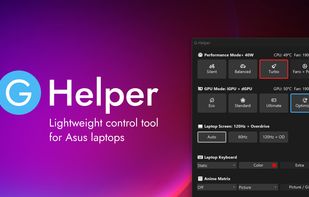
Small executable tool for Asus laptops providing advanced and customizable power modes, seamless GPU switching, fan curve editing, lighting control, temperature monitoring, hotkeys, battery protection, and integrated automation features for device management.
G-Helper screenshot 1

Cost / License

Platforms

  • Windows
10likes
2comments
0articles

Features

G-Helper News & Activities

Highlights All activities

Recent News

No news, maybe you know any news worth sharing?
Share a News Tip

Recent activities

G-Helper information

  • Developed by

    NL flagSerge
  • Licensing

    Open Source (GPL-3.0) and Free product.
  • Written in

  • Alternatives

    4 alternatives listed
  • Supported Languages

    • English

AlternativeTo Categories

OS & UtilitiesSystem & Hardware

GitHub repository

  •  13,658 Stars
  •  507 Forks
  •  132 Open Issues
  •   Updated  
View on GitHub

Our users have written 2 comments and reviews about G-Helper, and it has gotten 10 likes

G-Helper was added to AlternativeTo by Remych04 on and this page was last updated . G-Helper is sometimes referred to as GHelper

Comments and Reviews

   
Top Positive Comment
NejyCR
2

A better, open source version of Armory Crate. The fan speed-temperature customizable curve is top tier.

3Nya3
0

Very customizable and does what armoury crate does

Featured in Lists

If you just got a Windows-based handheld like e.g: Lenovo Legion Go, ASUS ROG Ally, MSI Claw, or you're just …

List by Zari37 with 39 apps, updated

What is G-Helper?

Small and lightweight Armoury Crate alternative for Asus laptops offering almost same functionality with much smaller footprint.

Works with all popular models, such as ROG Zephyrus G14, G15, G16, M16, Flow X13, Flow X16, Flow Z13, DUO, TUF Series, Strix or Scar Series, ProArt, Vivobook, Zenbook, ROG Ally or Ally X and many more!

Advantages

  • Seamless and automatic GPU switching
  • All performance modes can be fully customized with power limits and fan curves
  • Lightweight. Doesn't install anything in your system. Just a single exe to run
  • Simple and clean native UI with easy access to all settings
  • FN-Lock and custom hotkeys

Main Features

  • Performance: Silent - Balanced - Turbo (built-in, with default fan curves)
  • GPU modes: Eco - Standard - Ultimate - Optimized
  • Screen refresh rate and Display overdrive
  • Custom fan curve editor, power limits and turbo boost selection for every performance mode
  • Anime Matrix or Slash Lighting control including animated GIFs, clock and Audio visualizer
  • Backlight animation modes and colors
  • Hotkey handling
  • Monitor CPU and GPU temperature, fan speeds and battery status
  • Battery charge limit to preserve battery health
  • NVidia GPU overclocking and undervolting
  • XG Mobile Control
  • AMD CPU Undervolting
  • BIOS and Driver Updates
  • Asus Mice settings
  • Mini-led multi-zone switch
  • Flicker-free dimming and Visual Modes

Performance Modes

  • Silent in BIOS + Best power efficiency power mode
  • Balanced in BIOS + Balanced power mode
  • Turbo in BIOS + Best performance power mode

Automation

  • Performance Mode switching when on battery or plugged in
  • Optimized GPU mode - disables dGPU on battery and enables when plugged in
  • Auto Screen refresh rate (60Hz on battery and max Hz when plugged)
  • Keyboard backlight timeout on battery or when plugged in

GPU Modes

  • Eco : only low power integrated GPU enabled, iGPU drives built in display
  • Standard (MS Hybrid) : iGPU and dGPU enabled, iGPU drives built in display
  • Ultimate: iGPU and dGPU enabled, but dGPU drives built in display (supported on 2022+ models)
  • Optimized: disables dGPU on battery (Eco) and enables when plugged in (Standard)

G-Helper Videos

Show 2 more videos

Official Links