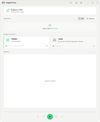
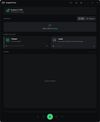
GogglePlayer is a Windows app that plays video from your PC on DLNA and UPnP devices on your local network. It was built for DJI Goggles 2 and DJI Goggles 3. It also works with TVs, projectors, media players and other devices, including ones that only accept a few formats.
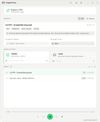
Pick a device, open a file or choose a source, and press Play. GogglePlayer finds the devices on your network, serves the stream, and converts the file only when the device can't play it as it is.
Formats: If the device can play a file, it gets the file unchanged. H.264 video in MKV is repackaged without re-encoding. AC3, E-AC3, DTS, Opus and FLAC audio is converted to AAC and the video is left alone. HEVC, AV1, 10-bit, VC-1, MPEG-2 and other video the device can't play is transcoded to H.264. Encoding uses Intel Quick Sync, NVIDIA NVENC or AMD AMF when the PC has one. Otherwise it uses OpenH264.
Sources: You can play local video files and stream your desktop with its sound (screen mirroring). Webcams, USB HDMI capture cards and OBS Virtual Camera work too, and their audio can come along. You can also play video URLs if you install yt-dlp yourself (GogglePlayer doesn't include it). The video downloads first and then plays. Desktop streaming runs about 3 seconds behind on DJI Goggles, so it works for watching but not for gaming.
Split audio: The picture plays on the device while the sound plays on your PC speakers or on wired or Bluetooth headphones. The sound is kept in sync automatically. You can adjust the offset for your headset's latency, and a resync button fixes drift after a network dip.
Playback: Text subtitles (SRT, ASS, SSA), embedded or external, are burned into the video. You can pick the audio track. Each file remembers where you stopped, along with its audio track and subtitle. The queue is kept between sessions and moves on to the next file automatically. Cinema mode darkens the PC screen while you wear the goggles. There are keyboard shortcuts for most controls. If your network blocks discovery, you can add a device by its IP address. The app is in English and German.
Privacy: Everything runs on your local network, and your files never leave it. There is no account, no cloud upload, no ads and no telemetry. The app only goes online if you use the optional URL feature.









 POX added GogglePlayer as alternative to Castor
 ppk added GogglePlayer as alternative to LetsView
 ppk added GogglePlayer as alternative to AirServer
 ppk added GogglePlayer as alternative to Airflow and AirPlayer


 PPK Software
