Hammer: A simple tool for building stories, and the worlds they live in.
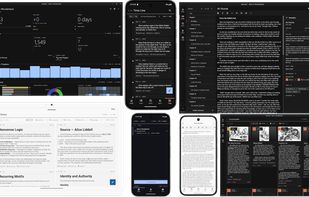
Free, open source, offline-first, and available on Windows, macOS, Linux, Android and iOS.
Write in scenes
Break your book into scenes as small or as large as you like, group them into chapters,
and drag them into a new order when the story changes. Each scene carries its own outline
and notes, visible beside the prose or hidden when you want the page to yourself. Keep
draft revisions of any scene and go back to an earlier one whenever you need it.
An encyclopedia that reads your drafts
Create entries for characters, locations, events and anything else you invent, with
images and tags. Hammer scans your scenes and works out who and what appears in them, so
opening a character shows every scene they turn up in, without anyone having to remember
to tag anything. Search entries by name or by #tag.
Timeline and notes
Put the events of your story, or the history of your world, on a dated and tagged
timeline. Keep tagged notes about the book alongside the manuscript instead of in a file
on your desktop.
Writing stats that motivate you
Keep track of how many words you're writing, and keep on track with daily or weekly goals.
Send it to an editor
Pick the scenes, enter an email address, and Hammer sends a link. Your editor, beta
reader, or friend opens it in a browser and marks up the prose with suggested edits.
No download, no account, and no copy of your project handed over. You see when they
opened it and how much they have read. Links can be labelled, expire, and be revoked.
Share and export
Share a story through a password-protected private link with an optional expiry date, or
publish it publicly under a pen name with an author page and read counts. Export the whole
book to Markdown, EPUB, PDF, Word or RTF, with the app explaining which format suits which
purpose while you choose.
Offline first
Hammer has never required an internet connection and never will. It is a genuinely native
app built with Kotlin and Compose Multiplatform, not a web page in a box, and it makes full
use of whatever screen it is on, from a phone to a large desktop display. Light and dark
themes throughout.
Transparent data
Your project is a folder of plain, human-readable files: one file per scene, named the way
you named it, with small readable files for notes and encyclopedia entries. Open it in your
file browser and the shape of your book is already there. Back it up, search it, or move it
somewhere else. If this program vanished tomorrow, your manuscript would still open in any
text editor.
Optional syncing
Syncing is entirely optional. Use on a single device and it never touches the
network. If you want your work on more than one device, run your own sync server or use the official server at hammer.ink.
Desktop-only users can also sync a project folder with Dropbox, Syncthing or similar.








 Pazvanti added Hammer Editor as alternative to Chronicle Writer
 Cipher-Write added Hammer Editor as alternative to CipherWrite
 QennaWriter added Hammer Editor as alternative to Qenna Writer
 NineRooms added Hammer Editor as alternative to Nine Rooms


 Wavesonics



