HearthMove moves a whole Windows PC to a new one over your own home network: files and folders, entire extra drives, applications, settings and profiles, and even AI chat histories. Every file is checked bit-for-bit as it lands, and when the move finishes a receipt is written to the desktop listing exactly what moved, what was verified, and anything that still needs attention. Other movers ask you to trust that it all copied; this one hands you proof.
Applications are handled the honest way. Copying an installed program from one machine to another breaks it, so HearthMove never does that - it identifies what is installed and reinstalls each app fresh and current from its official source, built for the new PC. Anything with no official source is listed on the receipt so nothing is quietly forgotten.
Settings come across too: browser bookmarks, mail, Telegram, and the hidden application data that makes a program feel like yours, re-linked so apps simply open and carry on. Outlook accounts that live on a mail server come back by themselves at sign-in, so their mail is not needlessly copied, while local .pst archives and email signatures are moved with a short note on the desktop explaining the two clicks that reconnect them.
It also moves AI conversations. Claude Code, Claude Desktop and Codex histories are transferred and re-linked so they open on the new machine as if nothing happened, and every conversation can be exported to plain text as a keepsake.
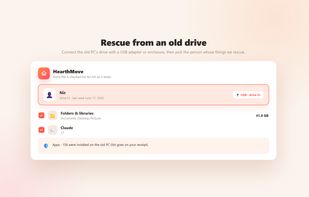
If the old PC will not start at all, HearthMove still works. Take its drive out, plug it into the new machine over USB, and the app finds the old Windows installation on that drive, shows the accounts that used it, and rescues their files, settings, app list and conversations - reading the old drive without ever writing to it, and reaching into folders the old Windows would normally protect. That is the moment most migration tools stop being useful.
Nothing leaves the house. The two PCs discover each other on the local network and pair with a short code shown on screen; the transfer is encrypted and travels directly between the machines, never through the internet, a cloud or anyone's server. No account, no analytics, no telemetry.
Windows, one-time purchase, no subscription, in 18 languages. A free trial is available through the Microsoft Store.







 swat777 added HearthMove as alternative to EaseUS Todo PCTrans, Zinstall WinWin, Endstate and Fab's AutoBackup
 Hearth Software

