
Hinode icon
Hinode icon

Hinode

Cloud workspace for AI image and video work that keeps your files and ComfyUI setup between sessions, with L4, L40S or RTX PRO 6000 machines attached by the minute.
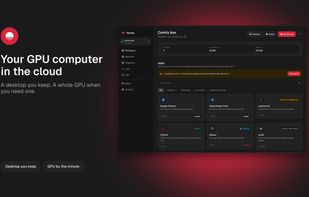
Hinode screenshot 1

Cost / License

  • Pay once
  • Proprietary

Application type

Platforms

  • Online
  • Windows
  • Mac
  • Linux
0likes
0articles

Features

Properties

  1.  Lightweight
  2.  AI-Powered

Features

  1.  Image to Image Generation
  2.  Text to Image Generation
  3.  Container Virtualization
  4.  Extensible by Plugins/Extensions
  5.  No Coding Required
  6.  Two-factor Authentication
  7.  Dark Mode
  8. Git icon  Git Support
  9.  Ad-free
  10.  Live Preview
  11.  Automatic Backup
  12.  Encrypted Backup
  13.  Cloud Sync

Hinode News & Activities

Highlights All activities

Recent activities

Hinode information

  • Developed by

    US flagEternity Cat
  • Licensing

    Proprietary and Commercial product.
  • Pricing

    One time purchase (perpetual license) ranging between $1 and $12.
  • Alternatives

    3 alternatives listed
  • Badge

    Get an embeddable badge for Hinode
  • Supported Languages

    • English
Hinode was added to AlternativeTo by Ilya Amursky on and this page was last updated .
No comments or reviews, maybe you want to be first?

Official Links

What is Hinode?

Hinode is a cloud workspace for people who make images and video with AI. The workspace keeps your files, installed applications and a shared folder for models and datasets between sessions. When a job needs a whole GPU, you attach a machine beside it: NVIDIA L4 with 24 GB VRAM, L40S with 48 GB or RTX PRO 6000 with 96 GB, each with 32 to 256 GB of RAM. The machine starts from your saved workspace, so the tools you set up are already on it.

You can reach your work through a streamed Ubuntu desktop in the Hinode app for Mac, Windows and Linux, or in Chrome and Edge with nothing to install. It also works over SSH, with the hinode command-line tool, from VS Code Remote-SSH, or through an MCP connector for Claude and other assistants. ComfyUI, PyTorch, JupyterLab, Ollama, vLLM, AI Toolkit, Axolotl and a few other apps install in one click.

Billing is by the minute with no subscription. The workspace costs $0.297/hr while it runs, and GPU machines cost $1.75 to $12.58/hr, with a 15-minute minimum per machine. Both pause after 15 idle minutes, and your disk stays as it was. Storage is $0.15 per GB-month, the shared folder is $0.14 per GB-month and outbound traffic is $0.10 per GB. Workspaces run in US East or EU Frankfurt at the same prices, and a card is required to start.

Machines run Ubuntu Linux. The streamed desktop needs a computer; phones, Safari and Firefox can't display it, while SSH, the CLI and the assistant connector work from anywhere.
