
Horst Schaeffer Calendar icon

Horst Schaeffer Calendar

Windows Software. The Calendar window can be sized to display up to 12 month (any width/height ratio). The month range can be shifted step by step. Click on month or year caption to select any month or year.
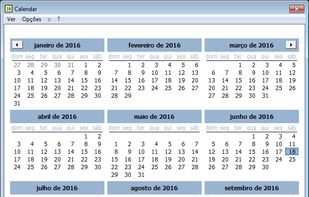
Full year view

Cost / License

  • Free
  • Proprietary

Application type

Platforms

  • Windows
1like
0articles

Features

  1.  Portable

Horst Schaeffer Calendar News & Activities

Highlights All activities

Recent activities

Horst Schaeffer Calendar information

Horst Schaeffer Calendar was added to AlternativeTo by Fernando Di Ramos C. S. de Britto on and this page was last updated .
No comments or reviews, maybe you want to be first?

What is Horst Schaeffer Calendar?

Windows Software. The Calendar window can be sized to display up to 12 month (any width/height ratio). The month range can be shifted step by step. Click on month or year caption to select any month or year.

Quick toggle: full year / personal layout.

The selected date (first button) or the current date and/or time (second button) can be copied to the clipboard. The date/time formats are selectable by menu (right mouse click on buttons offers two default formats each; up to 10 custom formats can be assigned in the INI file).

The default date/time formats and the month/weekday names will show according to the user's regional settings. Several language files are supplied for the menus (Unicode support).

View/Options: Full year view Show/hide "Today.." info Show/hide copy buttons Show week numbers Start with full year view Always on top Close window when copy Minimize to SystemTray XP style * Font, background colors Holidays, Events

  • User selected fonts and colors are not supported by Windows 7/8/10, unless you select XP style month boxes (see image).

The INI file is stored in the program folder by default. A different directory can be specified in the shortcut properties. No entries are made in the Windows Registry.

"Holidays", annual events or sports events, for example, are defined in tables (*.ann files, several files are supplied), and can be activated individually or combined. The dates will be highlighted; details available on right mouse click.

