ImageForge is a complete, professional-grade image toolkit that runs entirely on your Windows PC. Resize, compress, convert, watermark, crop and batch-process thousands of images in seconds — without ever uploading a single file. Your photos never leave your computer, so it stays fast, private, and safe for sensitive, client, and commercial work.
Everything happens locally. No internet connection, no account, no cloud — just drop in a file or an entire folder and go.
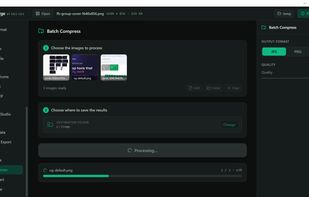
Batch processing built for real workloads:
- Resize, compress and convert entire folders in a single pass
- Queue different operations on different image sets and run them unattended
- Drag and drop whole folders and let ImageForge work through the queue automatically
Resize, compress and convert:
- Resize to exact dimensions, a percentage, or a target long/short side
- Compress to shrink file size dramatically with no visible quality loss
- Convert between PNG, JPEG, WebP and more
Watermarking:
- Add text or logo watermarks across an entire batch
- Full control over placement, opacity and rotation
Crop, canvas and framing:
- Crop to social aspect-ratio presets (Instagram Square 1:1 and more)
- Add borders and padding, or extend the canvas
- Rotate and flip with full EXIF awareness
- Sharpen automatically after downscaling for crisp results
Print and professional workflows:
- Convert colour profiles and DPI for print-ready output
- Strip EXIF, IPTC and XMP metadata to protect your privacy
Rename and presets:
- Rename on export with flexible naming patterns
- Save reusable presets like "Instagram Square — 1:1 crop, 1080px, WebP 85%" and reapply them in one click
Built for product photographers, content creators, designers, e-commerce sellers and web developers who need speed, control and privacy — without a subscription or a monthly cloud bill.
ImageForge is 100% free. No limits, no account, no ads, no subscription — every tool, full quality, forever. And because it runs entirely offline, it is always fast and your images always stay yours.







 monsernet added Image Forge as alternative to ImageMagick, XnConvert, G'MIC and GraphicsMagick


Comments and Reviews
All features are free