




Jet Screenshot
16 likes
Jet Screenshot is a freeware utility enabling you to share screenshot via the internet in seconds. It allows you to take a screen snap, edit it and send it to the Web, so that you can immediately provide anyone with a link to the image.

Cost / License
- Freemium
- Proprietary
Application type
Platforms
- Windows
- Online


Features
Jet Screenshot News & Activities
Highlights All activities
Recent activities
No activities found.
Jet Screenshot information
Developed by
 ArcticLine Software
 Licensing
Proprietary and Freemium product.Pricing
free version with limited functionality.Alternatives
39 alternatives listedBadge
Get an embeddable badge for Jet ScreenshotSupported Languages


Comments and Reviews
There are a number of criticisms of JetScreenshot posted on AlternativeTo.net and other places on the Internet.
And, to be very frank, these criticisms are valid ones.
But, it does deserve some respect and a warm smile for some of its uniquely useful features.
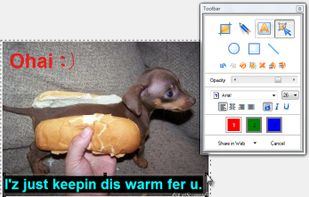
Of note, the JetScreenshot Editing Dialog Box which allows the user to 'graphically markup' the screenshot that the user had just initiated the screen-capture for.
From what I've seen, something that sets it apart is that the various 'image markups' that are placed onto it are done in a (for lack of a better description) 'PowerPoint-esque drag-and-drop object creation and layout method'.
While it's true that other screenshot software programs do offer abilities that are similar, from what I have seen so far, the graphical markup abilities that JetScreenshot offers are unique among programs, and very possibly the best.
I think it would be a good idea for other software developers to closely study the JetScreenshot Editing Dialog Box for graphical markup, that its usefulness might be implemented in other screenshot programs.
Or, in the alternative, that users contact the makers of JetScreenshot and lobby that the designers that the software be improved to contain the advantages other screenshot software programs offer, as well as other aspects such as availability as fully-functional freeware.
Appended image file? It'll show you the JetScreenshot Editing Dialog Box for graphical markup I've been warmly describing:
Comparison ................................. Jing ............GreenShot ....Jet ScreenShot:
Space on Harddisk (kB).............. 1 12983..... 3 1851 ...........2 5315kB
Language(s): ................................ 1 en. ......... 3 en. + ge...... 1 en.
Filename empty spaces: ............. 1 No ......... 3 Yes ............ 3 Yes
Record screen-video: .................. 2 Yes......... 1 No ............. 1 No
OCR send Text ClipBoard .......... 0 No .......... 6 Yes ............0 No
Save-to-File & keep ClipBoard .. 1 No .......... 3 Yes ............1 No
Available as portable app ........... 0 No .......... 3 Yes ............0 No
Annotating tools:
Highlighting: ................................ 2 Yes ........ 1 No .............. 2 Yes
Line-thickness: ........................... 1 fixed ...... 3 select.......... 3 select
Filled rectangle: .......................... 1 No .......... 3 Yes ............ 1 No
Arrows: ......................................... 3 Yes ........ 3 Yes ............ 1 No
Enough Colours: ........................ 3 Yes: 9 .... 3 Yes:100... 1 No: 3 (no black)
Web upload features:
Web-upload (no proxy): .............. 9 Yes ........ 9 Yes ............. 9 Yes
Up to HTTP-proxy-web: .............. 5 Yes ........ 0 No .............. 0 No
Up to FTP-webserver: ................. 0 No ......... 0 No .............. 1 Yes
Shots History in web: .................. 3 Yes ....... 0 No .............. 0 No
Sum Assessment-Points .......... 33 ............. 44 .................. 26
This review concerns Greenshot-RC7-NO-INSTALLER-0.8.1.1427.zip with OCR-Plugin.