


John's Background Switcher
67 likes
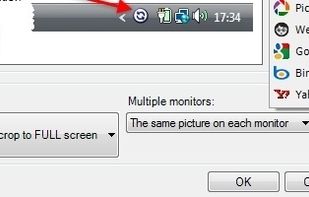
John’s Background Switcher (or JBS for short) periodically changes the wallpaper on your computer (like every hour or every day) to something interesting. JBS sits in your system tray (down by the clock) and changes your background at the time interval of your choosing.

Cost / License
- Freemium
- Proprietary
Application type
Platforms
- Mac
- Windows


Features
John's Background Switcher News & Activities
Highlights All activities
Recent News
No news, maybe you know any news worth sharing?
Share a News TipRecent activities
 getapps added John's Background Switcher as alternative to WallpaperBrew
 MrLegit added John's Background Switcher as alternative to ByAldon DailyWall
 elevenapril added John's Background Switcher as alternative to MapPoster
- K0RR added John's Background Switcher as alternative to nitrogen
 tataouinea added John's Background Switcher as alternative to WinWallhaven


Featured in Lists

A list with 53 apps by MandoVera without a description.
List by MandoVera with 53 apps, updated

Just decided to add here all the software I use and can't live without (mostly).
List by Weltall with 45 apps, updated
A list with 86 apps by Starflux923 without a description.
List by Starflux923 with 86 apps, updated

What is John's Background Switcher?
John's Background Switcher information
Developed by
 John Conners
 Licensing
Proprietary and Freemium product.Pricing
free version with limited functionality.Rating
Average rating of 5Alternatives
45 alternatives listedBadge
Get an embeddable badge for John's Background SwitcherSupported Languages


Comments and Reviews
This is the one! Free, no bull and the randomizer actually allows you to say to yourself: "Oh, I haven't seen this one since I added it to my gallery! I knew I had it in my gallery!" It uses a way better randomizer unlike many others (including Window's built-in bs) that just repeat the images depending on the cheap time of day randomizing algo. This is a must have tool.
Love this app- but it's free, not freemium. If you choose not to buy a license, the app remains fully functional.
At least for what I have been wanting to use it, John's Background Switcher have been my to go program for years now. I wanted an app where it would use my handpicked pictures and after half a day it would switch them around to another. It is lightweight, sits hidden in the system tray and if you double click it's icon, it will replace the backgrounds, in case I wanted to flip through some of them manually. Also, if you have multiple monitors, it will place different backgrounds on each of them.
I am giving it 5 stars, but again, only for what I wanted to use it for, as I have never delved into it fetching pictures online from different sources.
the best I found for two monitors.
For some reason the 'like' function is not working on John's Background Switcher...
Great tool! A really nice feature is the support for two monitors - it is possible to show different wallpapers on each monitor.
Your pictures showed by this software can be scaled a certain way.