
KeyMinder icon
KeyMinder icon

KeyMinder

Free, open-source macOS menu utility displaying real-time app and system shortcuts with live search, modifier-based filtering, click-to-execute capability, favorites, ignore lists, and localization in 17 languages. Requires macOS Sonoma and Accessibility permission.
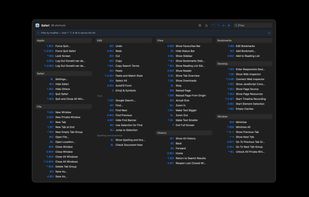
Safari's keyboard shortcuts in dark mode.

Cost / License

  • Free
  • Open Source (MIT)

Application type

Platforms

  • Mac  Requires Accessibility access to work
4likes
1comment
0articles

Features

  1.  Keyboard Shortcuts

KeyMinder News & Activities

Highlights All activities

Recent activities

  • esma2007 reviewed KeyMinder  

    KeyMinder is a surprisingly useful tool for macOS users. I like how it makes keyboard shortcuts easy to discover and remember, and the real-time search helps speed up everyday workflows without getting in the way.

  • POX added Cheat Sheet as a feature to KeyMinder
  • namdx1987 liked KeyMinder
  • CheatSheet icon
    dvdweyer added KeyMinder as alternative to CheatSheet
  • CheatSheet icon
    dvdweyer added KeyMinder as alternative to CheatSheet
  • deadserver, admonstrator and brnntn liked KeyMinder
  • Maoholguin updated KeyMinder
  • dvdweyer added KeyMinder

KeyMinder information

  • Developed by

    CH flagdvdweyer
  • Licensing

    Open Source (MIT) and Free product.
  • Written in

  • Alternatives

    4 alternatives listed
  • Supported Languages

    • English
    • German
    • French
    • Finnish
    • Italian
    • Chinese
    • Hindi
    • Spanish
    • Dutch
    • Swedish
    • Arabic
    • Hebrew
    • Danish
    • Japanese
    • Norwegian Bokmål

AlternativeTo Category

OS & Utilities

GitHub repository

  •  2 Stars
  •  1 Forks
  •  0 Open Issues
  •   Updated  
View on GitHub

Our users have written 1 comments and reviews about KeyMinder, and it has gotten 4 likes

KeyMinder was added to AlternativeTo by Donald van de Weyer on and this page was last updated .

Comments and Reviews

   
Esma Flores
0

KeyMinder is a surprisingly useful tool for macOS users. I like how it makes keyboard shortcuts easy to discover and remember, and the real-time search helps speed up everyday workflows without getting in the way.

What is KeyMinder?

KeyMinder is a free, open-source macOS menu bar app that instantly shows every keyboard shortcut available in whichever app you're currently using, grouped by menu.

Instead of hunting through menus to discover shortcuts, KeyMinder pops up a clean shortcut overview for the frontmost app on demand — triggered by a customizable global hotkey (default ??K) or a quick double-tap of a modifier key (?, ?, ^, or ?). Dismiss it the same way, or press Escape.

Key features:

  • Live, accurate shortcuts — reads menu structures directly via the macOS Accessibility API, so what you see always reflects the app's actual current menus
  • Click to run — click any shortcut row in the popup to execute that menu item immediately
  • Instant search — type to filter shortcuts as you type
  • Modifier filtering — hold or toggle ^ ? ? ? keys to filter by exact modifier combination
  • Favourites — pin frequently used shortcuts with a star; filter to them with one click
  • System shortcuts — optionally shows macOS system-wide shortcuts (Spotlight, screenshots, Mission Control, etc.) alongside app shortcuts
  • Ignore list — suppress noisy commands globally or per app
  • Fully localized — Arabic, Danish, Dutch, Finnish, French, German, Hebrew, Hindi, Italian, Japanese, Norwegian, Portuguese, Simplified Chinese, Spanish, Swedish, Traditional Chinese, and English
  • Sparkle auto-updater — checks for updates automatically in the background

KeyMinder requires macOS 14 (Sonoma) or later and Accessibility permission to read other apps' menus. It is distributed as a notarized Developer ID build (not on the Mac App Store, which is incompatible with the Accessibility API required for this kind of tool).

Official Links
