
Keys icon
Keys icon

Keys

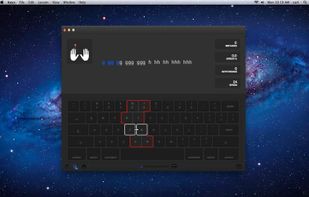
A simple and carefully crafted application to help you learn and master typing with ten fingers.

Typing with all ten fingers without looking at the keyboard, or touch-typing, is important not only to type fast, but also to remove an additional step between your thought process a.
Keys screenshot 1

Cost / License

  • Pay once
  • Proprietary

Platforms

  • Mac
2likes
0articles

Features

Properties

  1.  Educational
No features, maybe you want to suggest one?

Keys News & Activities

Highlights All activities

Recent activities

  • gogitype icon
    andyATgogitype added Keys as alternative to gogitype
  • GGReflex icon
    liamchoi added Keys as alternative to GGReflex
  • TypingLo  icon
    mahaveerji789789-sys added Keys as alternative to TypingLo
  • Tapotons icon
    tapotons added Keys as alternative to Tapotons
  • TypeLab icon
    typelab added Keys as alternative to TypeLab

Keys information

  • Developed by

    Florian Ebeling
  • Licensing

    Proprietary and Commercial product.
  • Pricing

    One time purchase (perpetual license) that costs $30.
  • Alternatives

    49 alternatives listed
  • Badge

    Get an embeddable badge for Keys
  • Supported Languages

    • English

AlternativeTo Category

Education & Reference

Popular alternatives

View all
Keys was added to AlternativeTo by aint on and this page was last updated .
No comments or reviews, maybe you want to be first?

Official Links

What is Keys?

A simple and carefully crafted application to help you learn and master typing with ten fingers.

Typing with all ten fingers without looking at the keyboard, or touch-typing, is important not only to type fast, but also to remove an additional step between your thought process and the text you work on.

This application teaches touch-typing. It shows you which finger needs to go to which key and rehearses the finger movements from one of its character to the other. This way it covers more and more keys of the keyboard with each lesson, until you know all of it.

Your training and progress is made visible by showing line charts for your typing accuracy and speed. It is made even more detailed and accessible by creating keyboard heatmaps of main indicator figures like error rate, speed and keystroke.

This version supports only U.S. keyboard layout.