

Klipto icon
Klipto icon

Klipto

Clipboard tool for macOS built around a paste queue: collect several items, then paste them back one at a time in order, with text transformations and text capture from images.
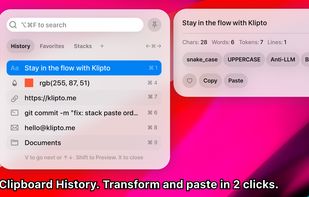
Klipto screenshot 1

Cost / License

  • Freemium (Pay once)
  • Proprietary

Application type

Platforms

  • Mac
2likes
0articles

Features

Properties

  1.  Lightweight
  2.  Privacy focused

Features

  1.  Works Offline
  2.  Ad-free
  3.  Full-Text Search
  4.  No registration required
  5.  OCR
  6.  No Tracking
  7.  Dark Mode
  8.  Screenshot OCR
  9.  Text-manipulation
  10.  Sits in the menu bar
  11.  Code Snippets
  12.  PDF OCR

Klipto News & Activities

Highlights All activities

Recent activities

Klipto information

  • Developed by

    Antony Kors
  • Licensing

    Proprietary and Freemium product.
  • Pricing

    One time purchase (perpetual license) that costs from $20 + free version with limited functionality.
  • Alternatives

    87 alternatives listed
  • Badge

    Get an embeddable badge for Klipto
  • Supported Languages

    • English
    • German
    • Spanish
    • French
    • Russian
Klipto was added to AlternativeTo by Klipto on and this page was last updated .
No comments or reviews, maybe you want to be first?

Official Links

What is Klipto?

Filling a long form by copying every field one at a time. Looking for something you copied last week. Retyping text off a screenshot because you can't select it. Klipto handles all three.

The Stack is the main thing. Copy ten items in a row, then paste them back one at a time, in order, without leaving the app you're in. Set it to press Tab or Enter after each paste and it walks itself down a form. Items can also be dragged out one by one, or saved as a collection for later.

Everything you copy stays in a searchable history with folders for the bits you reuse. Screenshots too: Klipto reads the text inside images, so searching for a word finds the screenshot it's in. A separate shortcut grabs text off any part of the screen, video and PDF included.

The preview panel has about twenty text tweaks: case changes, JSON formatting, HEX to RGB, pulling the domain out of a link, and a cleaner for the em dashes, curly quotes and invisible characters in AI text.

No account, no sign up, no telemetry. What you copy stays on the Mac. One network request, an update check, and it can be switched off. About 5 MB, native Swift, Apple Silicon and Intel, signed and notarized by Apple. Klipto is free for 14 days with no card, then a free tier keeps your last 25 items, or $19.99 once.

Klipto Videos