
Koberger icon
Koberger icon

Koberger

Browser-based formatter for indie authors managing a catalogue. Imports Word, Pages, and Google Docs manuscripts; reuses copyright, bio, and also-by pages; applies series-wide designs; creates box sets; previews ebooks and print pages; and exports EPUB, print PDF.
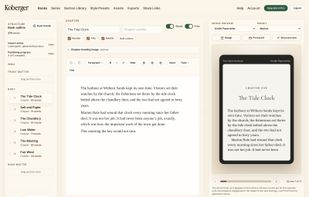
Book Studio: manuscript, outline, and a live ereader preview side by side.

Cost / License

  • Freemium (Subscription)
  • Proprietary

Application type

Platforms

  • Online
  • Software as a Service (SaaS)
0likes
0articles

Features

  1.  Ebook Conversion
  2.  Ad-free
  3.  Ebook Editor
  4.  Typesetting
  5.  Print on demand
  6.  Self-publishing

Koberger News & Activities

Highlights All activities

Recent activities

Koberger information

  • Developed by

    GB flagHut Six Digital
  • Licensing

    Proprietary and Freemium product.
  • Pricing

    Subscription ranging between $5 and $10 per month + free version with limited functionality.
  • Alternatives

    9 alternatives listed
  • Badge

    Get an embeddable badge for Koberger
  • Supported Languages

    • English

AlternativeTo Category

News & Books
Koberger was added to AlternativeTo by koberger on and this page was last updated .
No comments or reviews, maybe you want to be first?

Official Links

What is Koberger?

Koberger is a book formatting studio built for indie authors who publish more than once. Formatting one book is a task; keeping a growing catalogue consistent is the real job, and it is the one Koberger is designed around.

One account holds every book. Reusable sections keep your copyright page, author bio, and "also by" list linked across the catalogue, so updating them once updates every book, and placeholders fill in each book's own title and details automatically. Series tools track reading order, apply a design across a whole series in one step, build full or partial box sets, and push a source book's edits into its box set. When book four comes out, the back matter of books one to three is a five-minute update, not an afternoon.

Each book still gets full typographic control. Import a manuscript from Word, Pages, or Google Docs and Koberger detects your structure, applies a style preset, and shows a page-by-page ebook preview alongside a facing-page print proof built from the real print PDF. Fonts (including your own uploads), chapter openings, ornaments, running heads, justification, and language-aware print hyphenation are all adjustable per book or saved as your house style.

It is deliberately a formatter rather than a writing tool, in the vein of Vellum, but it runs entirely in the browser with no Mac requirement. Exports include EPUB, print-ready PDF interiors with proper bleed for KDP and other printers, and native DOCX, with readiness checks that flag problems before you publish. Everything up to export is free; one Pro subscription unlocks unlimited exports across the entire catalogue.
