
K
K

Konechi

macOS shows the same Wi-Fi symbol whether or not a cable is plugged in, so it is easy to think you are on Ethernet when you are not. Konechi puts a small mark in the menu bar that tells you which one is actually carrying your traffic, and names the connection when you open it.
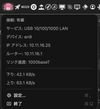
The menu bar item, showing the active connection by name
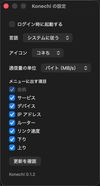
Settings for how the mark is displayed

Cost / License

  • Free
  • Open Source (MIT)

Application type

Platforms

  • Mac
0likes
0articles

Features

  1.  Sits in the menu bar

Konechi News & Activities

Highlights All activities

Recent activities

  • piro0919 added Konechi
  • piro0919 added Konechi as alternative to Netler

Konechi information

AlternativeTo Category

Network & Admin

GitHub repository

  •  0 Stars
  •  0 Forks
  •  2 Open Issues
  •   Updated  
View on GitHub

Popular alternatives

View all
Konechi was added to AlternativeTo by piro0919 on and this page was last updated .
No comments or reviews, maybe you want to be first?

Official Links

What is Konechi?

macOS shows the same Wi-Fi symbol whether or not a cable is plugged in, so it is easy to think you are on Ethernet when you are not. Konechi puts a small mark in the menu bar that tells you which one is actually carrying your traffic, and names the connection when you open it.
It asks macOS for the active network route and the names of the interfaces on the machine. That is configuration, not traffic — it never sees anything you send or receive, and nothing leaves the Mac.

Free and open source under the MIT license, for Apple Silicon Macs.
