? Features
🔍 Smart App Management
Apps are sorted by usage frequency automatically
Rarely used apps grouped and sorted alphabetically
App usage stats shown beside each app icon
Weekly phone usage summary with interactive graph
Daily usage breakdowns with pie charts
One-tap uninstall with long-press gesture
Toggle between smooth grid and list views
🔎 Smart Universal Search
Search apps, contacts, and perform web queries
Built-in calculator directly in search bar
Quick links to Play Store, browser, YouTube, and Google Maps
Tap-to-call, SMS, or WhatsApp directly from contact results
? Quick Actions
Time Widget ? Tap to open the Clock app
Date Widget ? Tap to open the Calendar app
Search Bar:
Long press ? Open Google in browser
Calculator support built-in
Weather Widget:
Shows real-time weather and forecast
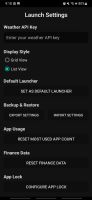
Change API key via Settings
Battery Widget:
Real-time battery percentage display
Charging status indicator
Always visible on home screen
🔕 Focus Mode
Long press focus icon to configure apps allowed during Focus Mode
Temporarily hide distracting apps
Set a countdown timer to auto-disable mode
Cannot exit until timer ends — stay on track
Visible timer countdown displayed on screen
🔐 App Lock
Lock any app via settings
PIN-based authentication before launching locked apps
Fingerprint unlock supported (if available on your device)
1-minute timeout after unlocking — no need to re-enter PIN during that window
After timeout, locked apps require authentication again
Ideal for securing sensitive apps like WhatsApp, Instagram, etc.
🔋 Power Saver Mode
Keeps wallpaper black to save battery
Hides app usage stats and weather updates
Ideal for low-power or OLED displays
? Todo List Widget (Now Smarter)
Add and manage daily tasks directly from the home screen
Set due time for each task
Assign priority: High, Medium, or Low
Enable recurring tasks: Daily, Weekly, or Custom
Mark tasks as complete with visual strikethrough
Tap "Add Todo" to schedule tasks with advanced options
Persistent task tracking with clean UI
🔔 Notifications Widget
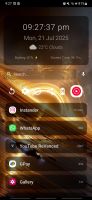
View unread notification count badge
Quick access to recent notifications on home screen
Swipe to dismiss notifications directly from launcher
Tap notifications to open the related app
Requires notification access permission









 justarandom added Launch as alternative to Arc Launcher (AndroidTV)
 justarandom added Launch as alternative to Kvæsitso, Stario, Smart Launcher and KISS Launcher
 Guru Swarupa
