Letterboxx is a dedicated Mac app for email newsletters. It helps you import newsletter copies from the mail account(s) and folders you choose, organize them locally, and read them somewhere that is not your everyday email inbox, giving you your own comfy newsletter library with all the stuff you intended to read, but never make the time to because you're doing email triage.
Use Letterboxx for the newsletters you actually meant to read when you first signed up for them but then forgot about: All the essays, digests, news roundups, product updates, research, deals, local updates, niche publications, and anything else you subscribe to will now be in it's own space. And now you can actually make time to read it with no distractions. Letterboxx is like curling up with a good book. It's your very own library of interests tucked away in the peaceful and quiet space they deserve.
What Letterboxx helps you do:
• Keep newsletters out of your email inbox: Connect a supported email account(s), choose the folder(s) Letterboxx should check, and build a dedicated reading library on your Mac.
• Organize with Letterboxes: Create custom folders (Letterboxxes) for topics, publishers, projects, hobbies, shopping, research, or anything else you follow.
• Sort newsletters automatically: Auto-Delivery can route recurring newsletters into the right Letterboxx based on sender, recipient, subject, content, and other message details.
• Built-in ad-blocking and tracker prevention: Clean View helps tidy messy newsletter HTML so the good parts are easier to read and faster to load.
• Highlight what matters: Mark useful passages in familiar highlighter colors, then return to them later as needed.
• Save things for later: Use unread, favorites, reminders, quick filters, highlights, and search to keep track of what still needs attention.
• Manage newsletter subscriptions more easily: When Letterboxx detects an unsubscribe link, it helps you get to the right place without digging through a newsletter footer.
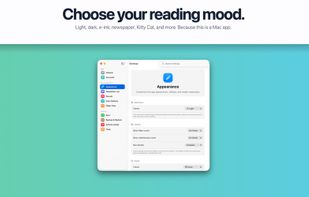
• Feel at home on macOS: Letterboxx uses a familiar Mac layout with a sidebar, native-style controls, keyboard shortcuts, menu commands, swipe actions, themes, and a focused reading pane.
Letterboxx is not a general-purpose email client. There is no composing, replying, or inbox-zero pressure. It works especially well with a dedicated newsletter email address, but you can also connect an existing account and choose only the folders you want Letterboxx to use.
Private by design:
Your newsletter library lives on your Mac. Letterboxx does not include ads, social features, public user content, or data selling. Your original messages stay in your connected mail account during normal import.
Give your newsletters the home they've always deserved.







 Michael-Korva added Letterboxx as alternative to Korva
 boseclaw-autocomp added Letterboxx as alternative to Weekly Brief
 letterboxx added Letterboxx as alternative to Newsletter.ist, Meco, Bilig and Readless


 Letterboxx Software LLC

