
lidawake icon
lidawake icon

lidawake

lidawake keeps your Mac awake with the lid closed — for an overnight job with no monitor attached, or an external monitor in clamshell mode on battery. Keeping a Mac awake is easy — stopping safely is the product: it watches heat and battery, and hands sleep back even if the app crashes.
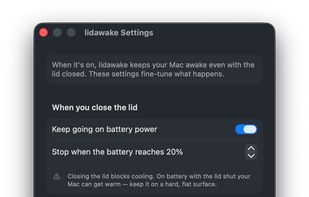
lidawake screenshot 1

Cost / License

  • Pay once
  • Open Source (MIT)

Application type

Platforms

  • Mac  Requires an Apple Silicon Mac (M1 or later) running macOS 13 Ventura or later. Intel Macs are not supported.
0likes
0articles

Features

Properties

  1.  Lightweight

Features

  1.  Ad-free
  2.  No registration required
  3.  Works Offline
  4.  No Tracking
  5.  Sits in the System Tray

lidawake News & Activities

Highlights All activities

Recent activities

lidawake information

AlternativeTo Category

OS & Utilities

GitHub repository

  •  0 Stars
  •  0 Forks
  •  0 Open Issues
  •   Updated  
View on GitHub
lidawake was added to AlternativeTo by zayco-it on and this page was last updated .
No comments or reviews, maybe you want to be first?

Official Links

What is lidawake?

Lidawake is a macOS menu-bar app that keeps your Mac awake while the lid is closed, controlled by a simple switch. It operates by setting macOS's pmset disablesleep, requiring root access. The app installs a small privileged helper via SMAppService, approved by the user once in Login Items. This helper is reached over XPC with a code-signature check in both directions. Normal sleep is restored when the app is switched off, quit or if it stops unexpectedly.

The app turns off the built-in display when the lid closes due to cooling restrictions. However, an external display stays on, enabling clamshell setups to continue working. The app stops automatically if the Mac becomes too warm and can switch off when the battery falls below a certain level. Running on battery with the lid closed is off by default and requires opting in. Open the lid and it tells you what happened while you were away — how long the Mac stayed awake and whether it ran hot.

Lidawake is typically used for letting long tasks finish with the MacBook closed, working on an external monitor once you're off the charger, or playing audio to external speakers. It requires an Apple Silicon Mac running macOS 13 or later; Intel Macs are not supported. The app is notarized by Apple and updates itself via Sparkle.

The source code is freely available (MIT) on GitHub and can be built for free. The ready-made notarized build can be purchased, comes with a 14-day free trial, and covers one Mac or three depending on the tier.

