





LiveFaceSwap AI
Like
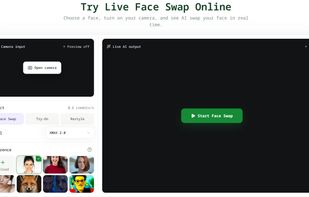
LiveFaceSwap AI is a browser-based workspace for real-time camera transformation. Choose your webcam, an image you have permission to use or a built-in preset, and an AI model to preview the result as you move.

Cost / License
- Freemium (Pay once or Subscription)
- Proprietary
Platforms
- Online


Features
LiveFaceSwap AI News & Activities
Highlights All activities
Recent activities
- livefaceswapai updated LiveFaceSwap AI
- Maoholguin updated LiveFaceSwap AI
- cabbagehaox added LiveFaceSwap AI
 cabbagehaox added LiveFaceSwap AI as alternative to Auto Face Swap Pro, FaceSwap, Faceswapper.ai and SwapMyFace

LiveFaceSwap AI information
Developed by
LiveFaceSwap AILicensing
Proprietary and Freemium product.Pricing
One time purchase ranging between $15 and $119, and / or subscription ranging between $12 and $69 per month + free version with limited functionality.Alternatives
10 alternatives listedBadge
Get an embeddable badge for LiveFaceSwap AISupported Languages


No comments or reviews, maybe you want to be first?