




LockHunter
154 likes
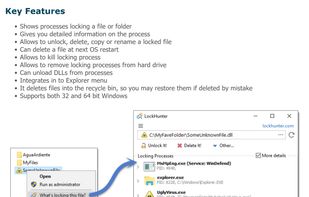
It is a free tool to delete files blocked by something you do not know. LockHunter is useful for fighting against malware, and other programs that are blocking files without a reason. Unlike other similar tools it deletes files into the recycle bin so you may restore them if...

Cost / License
- Free
- Proprietary
Application type
Platforms
- Windows


Features
LockHunter News & Activities
Highlights All activities
Recent News
No news, maybe you know any news worth sharing?
Share a News TipRecent activities
- Hau_Kai liked LockHunter
- strained173 liked LockHunter
- m619s liked LockHunter
- Creative_joe liked LockHunter
Featured in Lists

A curated list of Windows software that I've discovered (and been using) over the years, organized in categories....
List by city_zen with 66 apps, updated

My setup for a mix of development work and general use.
List by itsnate with 47 apps, updated

A list with 33 apps by getupw1th1t without a description.
List by getupw1th1t with 33 apps, updated
What is LockHunter?
LockHunter information
Developed by
 Crystal Rich
 Licensing
Proprietary and Free product.Rating
Average rating of 4.5Alternatives
18 alternatives listedBadge
Get an embeddable badge for LockHunterSupported Languages



Comments and Reviews
Unlocking sticky files/folders can be risky ... it should be done with caution. sometimes reboot can resolve the issue (safely remove any USB devices that might be implicated) Sticky USBs should be disconnected while the PC is shutdown
LockHunter PROS: Context Menu item makes unlocking easy ... point and click. One of the v.safe unlockers.
Example: Installed an ancient Win-XP app on Win-7 PRO x64 pc. EXE would run, but not show GUI. Was not listed in TaskManager. Could not delete nor unlock the old EXE. LockHunter showed a message that old EXE would be deleted on next boot. And it did . . :) :)
CON: The context menu caption is ridiculously long (verbose). I contacted the developer (email) several years ago, his reply: "he would think about it". A new version and he didn't think about it. :( Caption is not in Registry and I cannot dig deep enough with "Resource Hacker"
Example: _FileSearchEX has a default caption "Search via FileSearchEX" ... another overly verbose caption.
Light,Capable and Effective all you need to unlock and delete in use files or just see what process is locking a file or folder.
The Unlocker's substitute I was looking for.
Works in Windows 11.
I have not used it yet. I hope it does what I expect it to
It works as expected
I have been using Unlocker for many years, until I had to migrate to Windows 10. I had to search for an alternative since it did not work anymore on Windows 10 and LockHunter worked flawlessly. It is great for what it is created for, unlocking files due to them being stuck locked for one reason or another.