IGMate helps you quickly reveal who unfollowed you, who never followed back, and gives you safe tools to clean up your following list with confidence.
Key features:
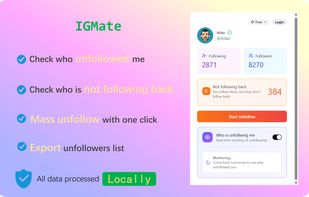
- See who unfollowed you — Instantly detect Instagram unfollowers and recent unfollow events.
- Check who doesn’t follow you back — Quickly identify non-followers and one-way relationships.
- Safe mass unfollow — Bulk unfollow non-followers or recent unfollowers with built-in protection.
- Human-like unfollow mode — Adjustable speed and smart retry strategy to keep your account safe.
- Export unfollowers to Excel — Download clean lists for analysis or record-keeping.
- Track recent activity — View recent followers, recent followings, and relationship changes.
- 100% local processing — No data uploads, no servers, complete privacy protection.
What is IGMate?
IGMate is a fast, secure, and privacy-focused Instagram follower viewer that helps you clearly see who recently unfollowed you, who doesn’t follow you back, and quickly take action. Everything runs 100% locally in your browser — we never upload your Instagram data to any server.
Whether you’re trying to understand your follower changes or simply want a clean following list, IGMate gives you an accurate and safe way to track Instagram activity without compromising account security.
See Who Unfollowed You on Instagram Instantly
- No more guessing. With IGMate, you can easily check:
- Who unfollowed you on Instagram recently
- Who doesn’t follow you back on Instagram
- Who stopped following you
- Your recent followers and recent followings
- Using our Instagram unfollowers tracker, you get an organized list that makes it simple to understand your account’s relationship changes.
Track Followers and Unfollowers Accurately
• IGMate includes a built-in follower tracker IG users have been asking for:
• Clear follower/follow-back relationships
• Detect unfollowers on IG quickly
- Mass Unfollow on Instagram Safely
- One-click bulk unfollow
- Mass unfollow people who don’t follow you back
Export Your Unfollowers to Excel
-->Perfect for creators, businesses, or anyone who needs follower data for analysis.
Privacy & Security – Everything Stays Local
• 100% local processing
-->This makes it safer than most Instagram unfollow checker apps that store your data elsewhere.
How to Use IGMate
Getting started takes only a few seconds:
👉 Install the “See unfollower and mass unfollow them on IG” extension
Click “Add to Chrome” in the top-right corner of this page.
👉 Pin the extension (optional but highly recommended)
This keeps IGMate accessible in your toolbar since you'll likely use it often.
👉 Click the IGMate icon in your browser toolbar
The dashboard will open instantly.
👉 Hit “Start Unfollow”
IGMate will analyze your unfollowers and non-followers, and you can manage them with one click.
Simple, fast, and designed to fit naturally into your daily Instagram use.







 InstagramFollowerTracker added IGMate MassUnfollow as alternative to Instagram Follower Tracker (IFT)
 PixSpeed added IGMate MassUnfollow as alternative to UnfollowPeek, IG Unfollower and UnfollowCheck

 igmate
