




MonitorControl
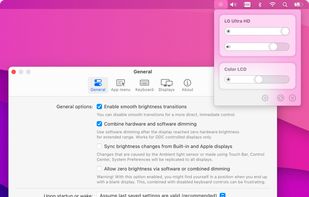
🖥 Control your external monitor brightness & volume on your Mac.

Cost / License
- Free
- Open Source (MIT)
Platforms
- Mac


Features
MonitorControl News & Activities
Recent News
Recent activities
 Ryder-Selikow added MonitorControl as alternative to Candela
 Didrik-Galteland added MonitorControl as alternative to Crisp - Monitor Control
- dmalto liked MonitorControl
 Punshnut added MonitorControl as alternative to Dimly
 Sascha88mh added MonitorControl as alternative to Lumino
 RamterStudio added MonitorControl as alternative to LumiMax
- ealowerd liked MonitorControl
 POX added MonitorControl as alternative to JoyScreen
I use a Mac Mini with a third party LG monitor as the primary one. LG’s own proprietary software was clunky and poorly documented, and ended up not even providing the support to link brightness control with the OS.
Instead, MonitorControl was able to do everything seamlessly in a much more simple to setup and interact with, yet more fleshed out plugin. Works as a simple menu bar icon and even integrates with Apple’s own brightness keybinds for quick adjustments, yet also contains many other...
I use a Mac Mini with a third party LG monitor as the primary one. LG’s own proprietary software was clunky and poorly documented, and ended up not even providing the support to link brightness control with the OS.
Instead, MonitorControl was able to do everything seamlessly in a much more simple to setup and interact with, yet more fleshed out plugin. Works as a simple menu bar icon and even integrates with Apple’s own brightness keybinds for quick adjustments, yet also contains many other...


MonitorControl information
Developed by
UnknownLicensing
Open Source (MIT) and Free product.Written in
Rating
Average rating of 5Alternatives
20 alternatives listedBadge
Get an embeddable badge for MonitorControlSupported Languages

AlternativeTo Categories
Audio & Music, System & HardwareGitHub repository
- 34,224 Stars
- 1,008 Forks
- 19 Open Issues
- Updated

Featured in Lists

A list with 49 apps by hercut without a description.
Comments and Reviews
I use a Mac Mini with a third party LG monitor as the primary one. LG’s own proprietary software was clunky and poorly documented, and ended up not even providing the support to link brightness control with the OS.
Instead, MonitorControl was able to do everything seamlessly in a much more simple to setup and interact with, yet more fleshed out plugin. Works as a simple menu bar icon and even integrates with Apple’s own brightness keybinds for quick adjustments, yet also contains many other options under the hood.
Excellent app! Much better than DisplayBuddy as allows changes using native Mac keyboard knobs.