
Movaro icon
Movaro icon

Movaro

Turn action footage into videos that show the speed, route and effort — with custom telemetry overlays, Community layouts and 4K export.
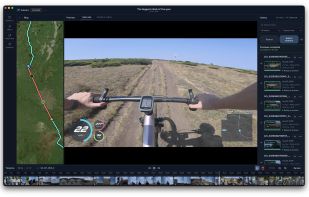
Bring the speed, route and effort into your action videos. Movaro’s timeline editor with synchronized telemetry and a custom layout.

Cost / License

  • Freemium (Pay once or Subscription)
  • Proprietary

Application type

Platforms

  • Mac  Apple Silicon; macOS 14 or later.
  • Windows  Public beta; x64.
1like
0articles

Features

Properties

  1.  Privacy focused

Features

  1.  Live Preview
  2.  Batch Editing
  3.  Support for Layers
  4.  Support for 4K
  5.  Ad-free
  6.  No registration required
  7.  Dark Mode
  8.  Hardware Accelerated
  9.  Non Destructive Editing
  10.  Works Offline

Movaro News & Activities

Highlights All activities

Recent activities

Movaro information

  • Developed by

    BG flagGeorgi Kostadinov
  • Licensing

    Proprietary and Freemium product.
  • Pricing

    One time purchase and / or subscription + free version with limited functionality.
  • Alternatives

    7 alternatives listed
  • Badge

    Get an embeddable badge for Movaro
  • Supported Languages

    • English
Movaro was added to AlternativeTo by gkostadinov on and this page was last updated .
No comments or reviews, maybe you want to be first?

Official Links

What is Movaro?

Show what the camera couldn’t: the speed of the descent, the route through the mountains, the effort behind the finish. Movaro brings your footage and recorded activity data together in videos that tell the whole story.

Start with a built-in sport layout, discover designs in Movaro Community, or create your own. Arrange maps, gauges, meters and text around the action. Customize colors, transparency and shadows, then save your look to use again or share with others. Layouts come in landscape, portrait, square and other formats.

Import a Strava activity or a GPX, FIT or TCX file and synchronize it with your clips. Show speed, pace, elevation, heart rate, power and other metrics available in your recording. Indoor activities work too, using recorded sensor data without a GPS route.

Trim, split and arrange footage while keeping its overlays synchronized. Export a finished video, individual clips with overlays, or transparent overlays to use in another video editor.

Start free and bring your activity data into 4K videos with customizable telemetry overlays. Explore Community layouts, create your own look, and upgrade for more advanced design and export options.

Available for macOS and Windows. Editing and rendering happen locally, with no footage upload required. Start free without creating an account; subscriptions and a one-time Founder plan are available.

Movaro Videos

