Myna Recorder icon
Myna Recorder icon

Myna Recorder

Records Windows keyboard and mouse actions as editable scripts, with image-based automation, screen monitoring, auto-clicking, and .exe export.
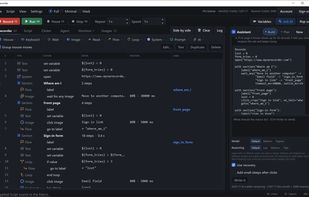
 Every step as a row, in sections, with the AI assistant beside it

Cost / License

  • Freemium (Subscription)
  • Proprietary

Application type

Platforms

  • Windows  Windows 10 or 11, 64-bit only.
0likes
0articles

Features

Properties

  1.  AI-Powered

Features

  1.  Portable
  2.  Ad-free
  3.  No registration required
  4.  OCR
  5.  Support for scripting
  6.  No Coding Required
  7.  Dark Mode
  8.  Macro Recording
  9.  Task Automation

Myna Recorder News & Activities

Highlights All activities

Recent activities

Myna Recorder information

  • Developed by

    IL flagMyna Recorder
  • Licensing

    Proprietary and Freemium product.
  • Pricing

    Subscription ranging between $10 and $15 per month + free version with limited functionality.
  • Alternatives

    7 alternatives listed
  • Badge

    Get an embeddable badge for Myna Recorder
  • Supported Languages

    • English
Myna Recorder was added to AlternativeTo by Myna Recorder on and this page was last updated .
No comments or reviews, maybe you want to be first?

Official Links

What is Myna Recorder?

Myna Recorder is a tool that records and replays your keyboard and mouse actions. It can find things on the screen by image instead of fixed coordinates, which allows it to adapt to moved windows, new resolutions, or different machines. It can also read text off the screen.

Each macro is a readable script that includes loops, conditions, variables, and functions. The script and step list are linked, so changing one changes the other. You can choose to run only selected lines.

An AI assistant can write a macro based on a plain-English description. The assistant also performs tasks step by step in Agent mode, checking the screen as it goes. A screen watchdog can alert you or stop the macro if it detects a specific image or gets a certain response from the AI.

The auto clicker feature is flexible, allowing for varied pacing and sequences of points. It can stop based on various triggers, including a time limit, a hotkey, or the cursor touching the top of the screen.

Alerts and notifications can be sent to Telegram, Discord, or a desktop popup. You can also control the tool via Telegram. Macros can be exported as a single .exe file that runs on any Windows PC.

The software does not send telemetry and only requires an internet connection for signing in and using the AI features. It runs on Windows 10 and 11, 64-bit, and does not require installation. There are free, Basic, and Pro plans available, with the Pro plan including AI features and 3,000 monthly credits.