




NetSpeedMonitor
63 likes
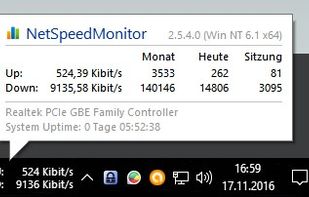
NetSpeedMonitor is a lightweight Network Monitoring Toolbar for your Windows Taskbar designed to be used on computers that run Windows XP, Windows Server 2003, Windows Vista or Windows 7. With NetSpeedMonitor you can monitor the current speed (up- and downstream) of your Network...

 EU
EUPlatforms
- Windows


Discontinued
The program is no longer available on the official website. Last version, 2.5.4.0, released in April 2010, can be still downloaded from Wayback Machine.

Features
NetSpeedMonitor News & Activities
Highlights All activities
Recent News
No news, maybe you know any news worth sharing?
Share a News TipRecent activities
 Spruce added NetSpeedMonitor as alternative to Copper Goose
- Usnyn liked NetSpeedMonitor
- sm4u liked NetSpeedMonitor
 domcyrus added NetSpeedMonitor as alternative to RustNet
- kamoltuk2001 liked NetSpeedMonitor
 POX added NetSpeedMonitor as alternative to Net Bar
- Douze added NetSpeedMonitor as alternative to BitMeter II


Featured in Lists

A collection of software that K2 recommends. Worth giving a try.
List by K2 with 69 apps, updated
What is NetSpeedMonitor?
NetSpeedMonitor information
Developed by
 Florian Gilles
 Licensing
Proprietary and Free product.Alternatives
44 alternatives listedBadge
Get an embeddable badge for NetSpeedMonitorSupported Languages


Comments and Reviews
There is new website of this program. Is this a scam/fake? https://netspeedmonitor.net/install-and-setup-netspeed-monitor/
You can use this software @ Windows 10 using the compatibility mode for setup. It works automatically for me. If not just use the mode for Win 8 or 7.
i've been using this for years, and it's one of those i install first. however, lately, i've been switching between LAN and wifi and it's getting bothersome to have to keep on switching the configuration every time. i wanted to ask the developer if he would consider maybe updating the app to include an "all network connection" option, so the graph would work regardless if i'm using wifi or LAN, but the email address provided rejected my email, it no longer was active. the website is also empty except for the developer's picture and short description. the app seems to have been discontinued already, such a pity, really.
This is the most simplistic, most useful bandwidth monitor I've ever used! Speed monitoring shows up in the task bar like some programs but upon mouse over you can get a quick glance of the accumulated traffic count (upload/download) and also the type of connection you are monitoring e.g. wireless or a local network connection.
NetSpeedMonitor is a very good choice when you need to display the download/upload speed of a certain network adapter on Windows' taskbar. It displays the customizable info in the taskbar to the left of the notification area. It can also display some totals and give warnings when you exceed a certain traffic volume. The best thing about it, it's free :)