Overview
NetSuite Field Explorer EX is a browser extension for NetSuite administrators, developers, and consultants. It gives you instant visibility into every field on any record: body fields with types, sublists with all columns, raw JSON, and a built-in navigation manager to declutter NetSuite's menu bar.
Open any record, click the icon, and get a complete breakdown of the record's data. Or use the Nav Manager on any NetSuite page to hide menu items you don't need.
Features
Field Explorer
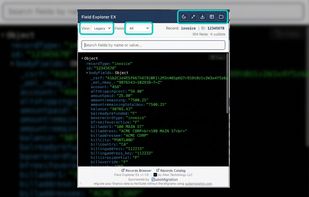
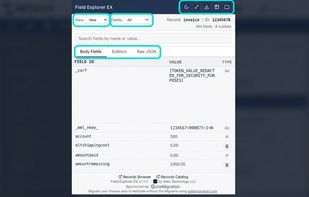
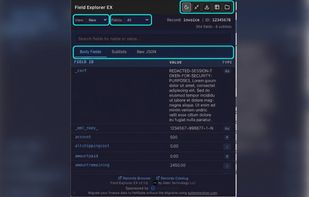
🔍 Body Fields Table · View all fields with IDs, values, and auto-detected types (checkbox, date, select, currency, etc.). Click any field ID or value to copy to clipboard.
📋 Sublists · Browse all sublists with column headers and line data. Select sublists from a dropdown, with line counts shown.
📄 Raw JSON · Full record data in formatted JSON, ready for inspection or copying.
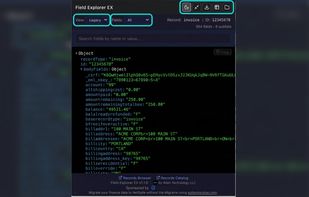
🌳 Legacy Tree View · JSONFormatter-powered expandable tree view for familiar drill-down inspection.
🔎 Search · Filter fields and sublists in real-time by name or value. Highlights matches across all views.
🏷? Field Filter · Toggle between All, Custom, or Standard fields across every view.
?? Sortable Columns · Click column headers to sort body fields by ID, value, or type.
📥 Export · Download filtered data as JSON or CSV with one click.
📖 Records Browser & Catalog Links · Quick links to NetSuite's official record documentation for the current record type.
🌙 Dark / Light Mode
📐 Compact Mode · Condensed layout for smaller screens.
?? Resizable Popup · Drag the corner grip to resize the popup width and height. Your preferred size is remembered across sessions.
Nav Manager:
🗂? Menu Visibility Control · Hide unwanted NetSuite navigation menu items. No more cluttered menu bars from installed bundles and SuiteApps.
🌐 All Instances · Hide menu items globally across every NetSuite account you use.
📋 Per-Account · Hide menu items for specific accounts only (auto-detected from URL).
🔄 Smart Overlap Handling · Items hidden globally show as locked in the account tree with a 🌐 indicator. No redundant storage.
? Instant Apply · Menu items hide/show immediately without page refresh via CSS injection.
🔎 Search · Filter the menu tree by name or automation ID.
🌲 Expandable Tree · Nested menu structure with expand/collapse controls.
💾 Persistent · Selections survive browser restarts. Stored locally, never transmitted.










 alien4u