




O&O RegEditor
24 likes
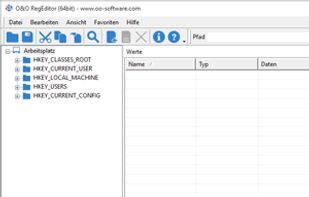
The O&O RegEditor makes working with the registration database significantly easier. It comes with an eminently user-friendly application, but it is through its portability that it really makes the life of an Administrator much easier.

Cost / License
- Free
- Proprietary
Application type
 EU
EUPlatforms
- Windows


Features
Featured in Lists

A list with 15 apps by M_O_Z_G without a description.
List by Aleksandr Dikov with 15 apps, updated
What is O&O RegEditor?
O&O RegEditor information
Developed by
 O&O
O&O Licensing
Proprietary and Free product.Rating
Average rating of 2.7Alternatives
15 alternatives listedBadge
Get an embeddable badge for O&O RegEditorSupported Languages


Comments and Reviews
Easily copy and past an entire registry path to navigate quickly through the registry. Very response, unlike the built-in regedit.
I have used this program in the past, but now with Windows 11 in constant evolution I prefer to not use it anymore. However it will be great if O&O RegEditor is updated for Windows 11.
Better than Regedit, of course but it's just a basic program with no frills (and no dark mode either.) It doesn't contain a few essential features I look for in Reg editors. Namely:
History - Saved history of manual changes including the ability to undo the changes.
Compare - The ability to compare registry trees and highlight changes. This is really handy for tracking down settings, and tracing installations.
Find and Replace - This would be a powerful tool, but dangerous of course. I use it a lot (in Registry Workshop) for correcting paths, or when I've changed a default program (i.e. Waterfox instead of Firefox.)
Quick Jump - The right-click option to jump to the same key in WoW6432Node, and other comparable branches. Also the right-click option to jump to same key in other open .reg files, as well as import the key and open afterwards.
Search Narrowing - No option in the Find dialogue to narrow the search by path, hive, or open file.
These are the reasons this program will not due as my full-time registry tool.
I do like that it is portable and lite, as most of O&O's programs are. I like that it has the ability to open remote registry hives, and I like that it offers to edit .reg files by default. I would like it to replace the Regedit command, for occasions when other programs offer to view the registry entry (common in Nirsoft utilities.)
**Note: Always open this (and all reg editors) As Admin, or many items will be missing from your searches. You also won't be able to edit many things otherwise.
O&O's products are generally pretty good. I particularly like O&O Shutup because it allows you to backup and import changes. O&O RegEditor does too, but you have to do it manually, rather than through a nice log.