OpenROM icon
OpenROM icon

OpenROM

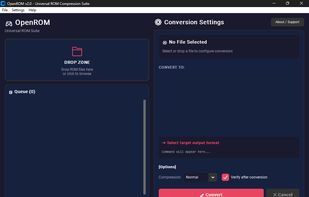
Offline desktop converter for retro disc images that converts ISO, BIN/CUE, GDI and IMG files to CHD, CSO, ECM, XISO or RVZ. It supports batch queues, drag-and-drop folders, magic-byte platform detection, automatic CUE creation, CHD verification and a scripting CLI.
OpenROM screenshot 1

Cost / License

  • Free
  • Open Source

Platforms

  • Mac
  • Windows
  • Linux
OpenROM screenshot 1
Alternatives
0likes
0alternatives
0articles

Features

  1.  File Compression

OpenROM News & Activities

Highlights All activities

Recent activities

  • justarandom added OpenROM
  • Fla updated OpenROM

OpenROM information

AlternativeTo Categories

Gaming SoftwareFile ManagementOS & Utilities

GitHub repository

  •  141 Stars
  •  2 Forks
  •  0 Open Issues
  •   Updated  
View on GitHub
OpenROM was added to AlternativeTo by Darlene Sonalder on and this page was last updated .
No comments or reviews, maybe you want to be first?

Official Links

What is OpenROM?

OpenROM is a free, open-source Universal ROM Conversion Suite built to replace every proprietary and fragmented ROM tool out there. Powered by a modern Flutter desktop UI with a gaming dashboard aesthetic, real-time terminal logging, batch processing, smart platform detection, and a full headless CLI for automation — all running 100% offline.

🎮 Features

Gaming Dashboard UI — Flutter-powered dark interface inspired by PS5/Xbox aesthetics, with ROM cards, platform badges, and real-time progress. Themeable — Swap between built-in themes (Gaming Dashboard, Cyberpunk, Terminal, Minimal) or create your own via JSON. Complete Conversion Matrix — 20+ conversion paths: ISO, BIN, CUE, GDI, IMG, ECM, CHD, CSO, ZSO, XISO, RVZ, WIA, WBFS, GCZ. Smart Platform Detection — Magic byte detection for PS1, PS2, PSP, Xbox, GameCube, Wii, Dreamcast — not size guessing. Real CHD Header Parsing — Reads actual CHD v4/v5 headers to determine CD vs DVD type accurately. Auto CUE Generation — Generates CUE sheets for standalone BIN files with correct track mode (MODE1/MODE2/AUDIO). Integrity Verification — Post-conversion CHD integrity check via chdman verify. Batch Processing — Drop a whole folder, convert everything at once. Real-time Terminal Log — Live process output with timestamps, slides up during conversion. Drag & Drop — Native drag and drop for files and folders. Full Headless CLI — openrom-core for scripting, automation, and Flutter IPC. No Telemetry — Zero network requests. No analytics. Runs 100% locally forever.