
OrderPrint icon
OrderPrint icon

OrderPrint

Monitors a shop's order-email inbox on a phone, extracts items, quantities, options, notes, totals and fulfilment times, then prints formatted kitchen tickets to 58 mm or 80 mm Bluetooth and network thermal printers. Keeps 50 orders for one-tap reprints.
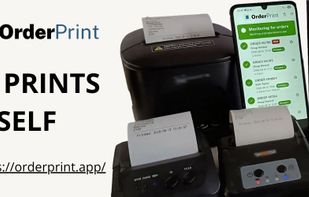
OrderPrint screenshot 1

Cost / License

  • Freemium (Subscription)
  • Proprietary

Platforms

  • Android
1like
0articles

Features

  1.  Ad-free
  2.  No Coding Required

OrderPrint News & Activities

Highlights All activities

Recent activities

OrderPrint information

  • Developed by

    Unknown
  • Licensing

    Proprietary and Freemium product.
  • Pricing

    Subscription that costs up to $25 per month + free version with limited functionality.
  • Alternatives

    4 alternatives listed
  • Badge

    Get an embeddable badge for OrderPrint
  • Supported Languages

    • English
OrderPrint was added to AlternativeTo by doughoseck on and this page was last updated .
No comments or reviews, maybe you want to be first?

Official Links

What is OrderPrint?

  1. Connect your email to the order inbox using an app password. No website plugin or shop modifications needed.

  2. Select a printer, either Bluetooth or network, 58mm or 80mm. Test print to ensure functionality.

  3. Keep the phone by the cash register. All new orders print within seconds without needing an account or website installation.

The system:

  • Monitors any mailbox, including Gmail, Outlook, Yahoo, and your domain.
  • Constantly checks for new orders and prints tickets within seconds.
  • Reads item details, quantities, notes, and totals, and presents them as a kitchen ticket.
  • Understands collection, delivery, and dine-in orders, along with the requested date and time.
  • Maintains a record of the last 50 orders.

The printer:

  • Works with Bluetooth and network thermal printers, 58mm and 80mm.
  • Can print to multiple printers simultaneously on any paid plan.
  • Allows for reprinting recent orders with one tap.
  • Tests print during setup to ensure functionality.
  • Prints currency symbols correctly.

The system alerts you:

  • With a status card that turns green when orders are printing.
  • Identifies specific issues such as email sign-in, connection, printer, or plan errors.
  • Alerts you when a ticket is not printed to avoid missing orders.
  • Warns you when you are nearing your monthly limit and informs you when printing resumes.
  • Provides built-in help for any potential issues.

OrderPrint Videos