




Parallels Desktop
148 likes
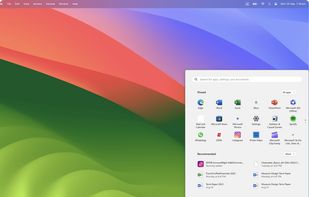
Virtualization software for running Windows, Linux, and other OSes on Mac. Supports Windows 11 on Apple Silicon, resource adjustments, and seamless app access and file sharing between OS environments.

Cost / License
- Subscription
- Proprietary
Application typeApplication types
Platforms
- Mac


Features

Parallels Desktop News & Activities
Highlights All activities
Recent News
- Maoholguin published news article about Parallels Desktop
 Parallels Desktop 26.1 brings new VM policies, conflict-aware deployment & Linux upgrades
Parallels Desktop 26.1 arrives just one month after version 26.0, introducing new management, deplo...
- Maoholguin published news article about Parallels Desktop
 Parallels Desktop 26 adds macOS Tahoe support with new IT tools and disk space controls
Parallels Desktop 26 brings full compatibility with macOS Tahoe 26 and Windows 11 25H2, ensuring vi...
- Maoholguin published news article about Parallels Desktop
 Parallels Desktop 20.3.0 adds x86_64 emulation fixes, OBS camera support & USB passthrough
Parallels Desktop 20.3.0 introduces new x86_64 emulation capabilities for Apple Silicon Macs, allow...


Recent activities
 POX added Parallels Desktop as alternative to WinPodX
- 87ck2nb7s2 liked Parallels Desktop
- Begenmedikler1m liked Parallels Desktop
- Evgeny9 liked Parallels Desktop
 justarandom added Parallels Desktop as alternative to MacMulator
 Ituaf added Parallels Desktop as alternative to Quickgui
- POX updated Parallels Desktop
- Fla updated Parallels Desktop
- meyco liked Parallels Desktop


Featured in Lists

A list with 43 apps by deadman36g_ without a description.
List by deadman36g_ with 43 apps, updated

A list with 139 apps by boniaditya without a description.
List by boniaditya with 139 apps, updated

This is a list curated for the purpose of helping to choose the software/ applications (apps) that should be...
List by Colin the Catalyst with 78 apps, updated

What is Parallels Desktop?
Parallels Desktop Videos
Parallels Desktop information
Developed by
 Parallels
 Licensing
Proprietary and Commercial product.Pricing
Subscription ranging between $4 and $8 per month.Rating
Average rating of 4Alternatives
57 alternatives listedNews
10 news article related to Parallels DesktopBadge
Get an embeddable badge for Parallels DesktopSupported Languages


Comments and Reviews
In case you don't know, "Coherence" mode is a feature in Parallel Desktops that simulates running Windows apps natively in OS X. Appearance-wise, it's sort of like Wine in Linux, except that it works with everything and it's a whole lot easier to configure.
I'll admit that I found Coherence mode to be rather trippy the first time I used it, but once you get used to seeing the Windows Task Manager pop up a few times over Finder, the whole thing is actually really, really cool.
P.S. I recommend turning off "Crystal Mode", which shares your Windows apps with your Mac while you're running Coherence Mode. That sounds nice, but it's not really well implemented. Basically, it just adds a couple (hundred) .exe files to your LaunchPad, so that it becomes impossible to find anything.
EDIT: In VMWare Fusion, this is called Unity Mode. It works about as well.
like Wine in Linux, except
except a hefty price tag
Stable and fast, and makes it super-easy to set up a Windows or Linux VM on your Mac. Host/guest integration is solid, and auto-updates as needed, as long as you stick with the major distros it supports (Fedora, Debian, Ubuntu and Kali).
Downsides:
Unless you already know exactly why parallels meets your corporate, multi-site needs, there is no reason to invest money exploring this option.
In the last four years there has been explosive growth in virtualization on both server farms ("the cloud"), and end user appliances as evidenced in on-chip support in consumer intel lines.
Also popular spy technique for NSA relies on native hardware virtualization and "always on" internets access even while computer is "off"
Consider unplugging computer when it is "off" to be off.
Make sure you have enough RAM before do virtualization!
I get a popup from Parallels Desktop asking me to register every time I reboot my computer, and it's annoying as hell. Here's how to disable it. http://forum.parallels.com/showpost.php?p=441726&postcount=5
Worked great for me since version 4. Latest version 6 is even faster and much better. I never tried Fusion, so I have no idea if it is any better than Parallels, but I did try VirtualBox and I could not even install Windows XP on that. Parallels all the way for me.
Parallels 5 completely freeze my MacBook! I'll move to vmware...