




PDFgear
75 likes
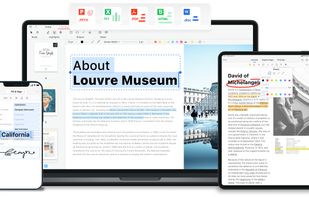
Read, edit, convert, merge, and sign PDF files across devices, for completely free and without signing up.

Cost / License
- Free
- Proprietary
Application typeApplication types
Platforms
- Mac
- Windows
- Online
- Android
- iPhone
- Android Tablet
- iPad


Features
PDFgear News & Activities
Highlights All activities
Recent News
- Fla published news article about PDFgear
 PDFgear, the free PDF editor, is now on Android
PDFgear, a free PDF editor, has expanded its accessibility by launching on Android, making it avail...

Recent activities
 Nettongia added PDFgear as alternative to Nettongia PDF Editor
- jamesboyd liked PDFgear
- bat9000 liked PDFgear
 POX added PDFgear as alternative to DinoReader
 OrdinaryPerson added PDFgear as alternative to PDFx (by AlexandrosGounis)
- dante920 liked PDFgear
- Miygal added PDFgear as alternative to PDF Viewer, Editor & Password



Featured in Lists

Everytime I setup a phone for a friend or myself I usually remove stock apps using adb or...
List by Darlene Sonalder with 140 apps, updated

There is no doubt that Adobe Suite is great, even in some case it's probably the best. But you can be mad...
List by Darlene Sonalder with 72 apps, updated
These are a list of actually useful AI tools that I use on a day-to-day basis. Almost all of them are free, and they...
List by Ben Kumar with 9 apps, updated



What is PDFgear?
PDFgear Videos
PDFgear information
Developed by
 PDF GEAR TECH PTE. LTD.
 Licensing
Proprietary and Free product.Rating
Average rating of 4.1Alternatives
88 alternatives listedBadge
Get an embeddable badge for PDFgearSupported Languages
AlternativeTo Categories
Office & Productivity, AI Tools & ServicesApple AppStore
- Updated
- 4.74 avg rating



Comments and Reviews
One great feature I immediately appreciated about it is that it doesn't reset its zoom setting when you click on a bookmark. This was an issue I encountered with Acrobat, PDF-Xchange, and Foxit Reader, where setting the zoom level to page width would reset to full page view when clicking on another bookmark.
Negatives: So far, I have only found two drawbacks:
Overall, it is an excellent free PDF software and a top alternative to popular PDF readers like Acrobat, Foxit Reader, and PDF-Xchange.
The AI or the way it interacts with the document is horrible. It makes things up constantly. I will read a page and then ask it to summarize it, and it will summarize something completely different.
Close but no cigar. Can't edit PDF and compared to Acrobat DC is way far from it. Mac version compression doesn't work and yields file sizes larger than the original making it entirely useless.
Best free PDF editor, converter, manager, etc. I use it on macOS and while the UI looks like a 1990s Windows app, the feature set is amazing and just plain works. Stop trying to search everywhere for alternatives, I am so freaking satisfied with this, it’s a lifesaver. Would be nice if it had some new macOS Liquid Glass type UI polish but if you’ve used MS Office on Windows you’ll feel right at home.
It's the closest thing I've found to Acrobat Pro. However, it lacks OCR functionality for PDF documents. It's also not open source and doesn't have a Linux version. But it's feature-rich and allows you to get by with PDF editing.
I’ve used its OCR on many PDFs. Works fine for me. I can choose which pages of the PDF to run OCR on and it gives me the plain text from those pages with extremely few errors (like a comma for a period sometimes). Big praises from me. Hope you can get it working.
make sure to block the app in the firewall
I love this app, saving me so much time and money. Its wonderful. One thing that i whish it had is linux support. That, adding a little competition to Foxit and Acrobat is great.