PitchCraft turns your phone or browser into a vocal coach. Sing into the microphone and watch your pitch drawn live on a piano-roll graph, so you can see exactly when you're sharp, flat, or right on the note.
Core features:
Real-time pitch detection that runs entirely on your device — the live microphone signal is analysed in the browser and never uploaded
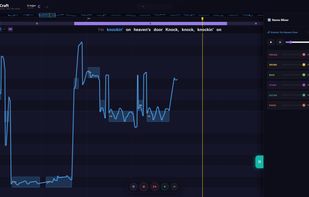
Piano-roll pitch graph with note names, cents deviation and a scrolling timeline
Vocal exercises, scales, workout patterns and key selection for deliberate practice
Sing-to-chords exercises: a chord progression plays under your voice, chord tones are highlighted in the graph and you get harmonic feedback on how well you sat in the chord
Reference track playback — load any song and sing along, with A/B comparison of your pitch against the original
Recording with a vocal performance report after every take: accuracy, stability, vibrato and where you drifted
Latency calibration for headphones, speakers and Bluetooth so your recorded voice lines up with the track
AI stem separation (free during the current pilot):
Upload a song and PitchCraft splits it into 4 or 6 stems — vocals, drums, bass and the rest, optionally guitar and piano — that you can mix, mute or solo independently. Chords and key are detected and shown in a bar above the graph, and you can transpose the whole song into your own range. Lyrics are transcribed and time-synced so they scroll alongside the pitch graph, karaoke-style. Record yourself over the stems, hear your voice as its own mixer channel, and export the result as a WAV mix — a backing track, a karaoke version or your finished cover. Stems can also be downloaded as a zip.
Songs uploaded for separation are processed on PitchCraft's server and deleted right after the job finishes. Sign in with Google to use separation for free during the pilot (a daily limit applies).
PitchCraft is free, has no ads, and requires no account for the pitch-training features. The interface is available in ten languages, including English, Czech, German, French, Spanish, Italian, Polish, Portuguese, Slovak and Ukrainian. It runs as a web app in any modern browser, can be installed to the home screen, and is available as a free Android app on Google Play.






 EU
EU


 angorak99 added PitchCraft as alternative to Vocal Pitch Monitor, Sing&See, Pitch-Chromatic Tuner and VocalBase
 smsm-8442 added PitchCraft as alternative to HaramLite
 angorak99 added PitchCraft as alternative to Simply Sing, Yousician, Smule and moises.ai


 THApps


