Imagine this! You are deep in an online meeting, pitching that big idea to important stakeholders.
Your laptop battery is dropping low, first 10%, then 6%.
Suddenly, the laptop screen turns black as you pause mid-sentence.
You scramble for a charging outlet. The next 2 minutes feel like 2 years.
You are embarrassed as you join back, and say, "Sorry, my battery died down."
—
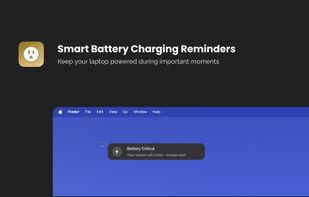
Sound familiar? PlugThatIn (Plug That In) is a lightweight menu-bar companion for macOS that notices before situations like this happen and nudges you to charge so you can stay productive instead of scrambling.
—
What PlugThatIn does:
-
Configurable Alerts: Choose when the charging reminder alerts start (at different battery levels, such as 30%, 25%, 20%, 15%, 10%, or 5%) and customize notification duration (between 1-10 seconds).
-
Floating Notifications: Battery alert messages follow your cursor movement, appearing right where you're working, impossible to miss. They track your cursor at a smooth 60fps, staying in your line of sight without being intrusive.
-
Reminder Mode: When battery hits your critical/lower levels, notifications can be extended to longer duration (15, 30, or 60 seconds) with optional sound alerts every 5 seconds, like how your car beeps when you don't have a seat belt on. No more ignoring warnings when it matters most.
-
Smart DND: Respect your Do-Not-Disturb preferences by detecting active microphones, cameras, and audio/video playbacks to stay quiet during calls and when you're watching something. You can configure which activities trigger Smart DND and whether to mute reminder notifications.
-
Multi-language Support - Full localization in English, Chinese, Japanese, Spanish, German, and French. Notifications and UI adapt to your system language automatically.
-
Light and Dark Themes - Pick the notification style that matches your workflow. Fixed colors (non-adaptive) ensure consistent visibility in any lighting or system settings.
—
Who PlugThatIn is for:
- Developers, designers, and creatives who get deep into flow and forget to check battery levels
- Remote workers and digital nomads who can't afford unexpected shutdowns during meetings
- Students taking online classes or working on assignments away from outlets
- Presenters and educators who need someone to watch out for them during demos and lectures
- Anyone who's lost work to a dead battery and never wants it to happen again
If that sounds relatable, give PlugThatIn a try.
Set your thresholds, enable Reminder Mode, and never lose power at the worst moment again; your work (and your stress levels) will thank you.







 POX added Plug That In as alternative to Battery Widget
