Plumsail Forms for SharePoint  icon

Plumsail Forms for SharePoint

Plumsail Forms is an app for designing custom forms for SharePoint Online and SharePoint SE / 2019. Forms can open directly from a SharePoint list or library in full screen, a panel, or a dialog, and can also be embedded seamlessly into any SharePoint page or Microsoft Teams tab.
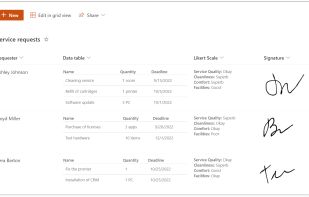
Plumsail Forms for SharePoint  screenshot 1

Cost / License

  • Pay once
  • Proprietary

Platforms

  • Windows
  • Microsoft SharePoint
6likes
0comments
0articles

Features

  1.  Export to PDF
  2.  Master Details forms
  3.  Automatic Form-Filler
  4.  Javascript scripting
  5.  Sub Forms

Plumsail Forms for SharePoint News & Activities

Highlights All activities

Recent activities

Plumsail Forms for SharePoint information

  • Developed by

    US flagPlumsail
  • Licensing

    Proprietary and Commercial product.
  • Pricing

    One time purchase (perpetual license) ranging between $89 and $1699.
  • Alternatives

    2 alternatives listed
  • Supported Languages

    • English
Plumsail Forms for SharePoint was added to AlternativeTo by Nikita Kurguzov on and this page was last updated .
No comments or reviews, maybe you want to be first?

What is Plumsail Forms for SharePoint ?

Plumsail Forms is an app for designing custom forms for SharePoint Online and SharePoint SE / 2019. Forms can open directly from a SharePoint list or library in full screen, a panel, or a dialog, and can also be embedded seamlessly into any SharePoint page or Microsoft Teams tab.

Design fully responsive forms using tabs and accordions, or build multi-step forms using a wizard container. Advanced controls extend your forms further: Ink Sketch for collecting signatures, Data Table for capturing repeating data, and the List or Library control for managing related data from other lists and libraries—all directly within the form interface.

In Plumsail Forms, you can configure cascading drop-downs using lookups connected to lists on the current site, across different sites, or even throughout separate site collections. For a single list, you can create multiple form views and automatically route users between them based on their Microsoft Entra ID or SharePoint groups, profile data, or specific field inputs.

To make forms dynamic, add no-code rules to fields, controls, and containers to conditionally show, hide, enable, or disable them. For advanced scenarios like dynamically populating fields or customizing form behavior, JavaScript is fully supported. Plumsail Forms offers a rich API for managing form content, complete with a built-in PnPjs library and native support for the Microsoft Graph API.

A free 30-day trial is available, allowing you to fully test its capabilities before purchasing.

Plumsail Forms for SharePoint Videos

Official Links
