PullMark icon
PullMark icon

PullMark

Native macOS Markdown reader that reviews GitHub pull requests as rendered diffs and stores review feedback as margin notes inside the file.
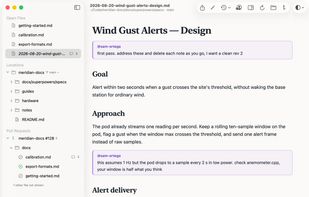
Margin notes: review feedback stored in the file itself, anchored to the passages it discusses

Cost / License

  • Free
  • Open Source (MIT)

Platforms

  • Mac
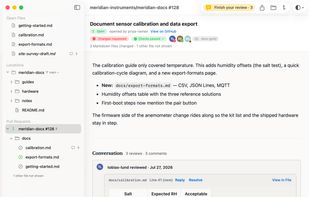
Pull request overview: review decision, reviewer verdicts, checks, and the conversation as a readable timeline
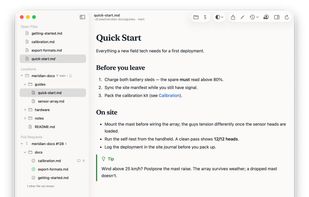
Local Markdown rendered the way readers will see it, with a live file tree in the sidebar
+1
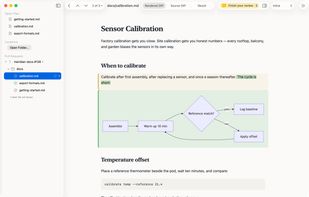
A documentation pull request as a rendered diff: changed words highlighted, diagrams rendered
Alternatives
2likes
0alternatives
0articles

Features

Properties

  1.  Lightweight
  2.  Privacy focused

Features

  1.  Dark Mode
  2. Git icon  Git Support
  3.  No Tracking
  4.  Support for MarkDown
  5.  Works Offline
  6.  Ad-free
  7.  No registration required
  8.  Syntax Highlighting
  9. GitHub icon  GitHub Integration
  10.  AI Agents friendly
  11.  Multiple languages
  12.  Pull requests

PullMark News & Activities

Highlights All activities

Recent activities

PullMark information

AlternativeTo Category

Development

GitHub repository

  •  12 Stars
  •  2 Forks
  •  1 Open Issues
  •   Updated  
View on GitHub
PullMark was added to AlternativeTo by Josh Riesenbach on and this page was last updated .
No comments or reviews, maybe you want to be first?

Official Links

What is PullMark?

PullMark is a native macOS app for people who think in rendered Markdown. It renders local files and folders the way readers will see them (GitHub-flavored Markdown, Mermaid, KaTeX, alerts, footnotes), and shows documentation-heavy GitHub pull requests as rendered diffs with just the changed words highlighted. You can comment, leave suggestions, and submit a review from the rendered page.

Margin notes turn any working draft into a review surface. A note is signed, anchored to the passage it discusses, and stored in the file itself as an ordinary HTML comment that stays out of the rendered output. The format is documented, so coding agents can read and act on the feedback ("address my notes in plan.md") without a commit or a pull request.

Free and open source (MIT), signed and notarized. It authenticates to GitHub with the credentials already on your system. Requires macOS 13 or later.