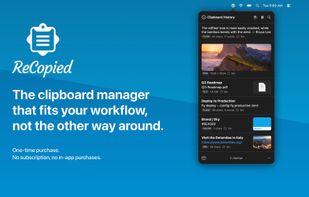
The clipboard manager that fits your workflow, not the other way around.
ReCopied is a fast, native clipboard manager for macOS. Everything you copy stays a keystroke away: text, links, images, files, colors, and code, ready to paste, search, or organize.
Most clipboard managers make you choose. A bare menu that only remembers plain text, or a big, rigid window you cannot shape to how you work. ReCopied gives you both and lets you tune either one. It is simple the moment you install it, and as powerful as you want when you are ready. The deep features are easy to find, not buried.
Two views, one app • A quick menu-bar popover, always a keystroke away and never in the way • A movable, resizable window you can park in a corner while you work • Switch between them anytime with one click, with the same Clip Lists and behavior in both
Never lose a copy • Full clipboard history with instant search across everything you have copied • Rich previews for links (with page titles), images, files, and more • Clear, adaptable actions for every clip
Understands what you copy • Colors show a live swatch with HEX, RGB, and HSL conversions • JSON is detected and pretty-printed; copy it minified or formatted • Timestamps translate to a human-readable date • Generate a QR code from any link, or pull text out of an image
Organize your way • Clip Lists keep reusable snippets grouped and permanent, enough to replace a separate snippets app • The Clip Queue lines up snippets and pastes them in sequence with a single shortcut, optionally straight into the app you are using, great for forms and repetitive work • Merge several clippings into one, and reshape any copy with Formatters
Automate the boring parts • Capture Rules file copies from an app into the right Clip List or Clip Queue automatically • Ignore rules keep passwords, API keys, and sensitive apps out of your history • Plain-text mode strips formatting when you want a clean paste
Make it yours • Looks right in light or dark, following your system or a theme you choose • Tune list spacing, font size, row height, and source-app icons
Private by design • Everything stays on your Mac. No account, no cloud, no analytics. • Honors the system concealed and transient clipboard flags used by password managers
Yours once, not monthly A one-time purchase. No subscription, no in-app purchases, no login. Buy it once and it is yours.
Requires Apple Silicon and macOS 26 or later.







 Kerry Gras-Usry
