RemoveAnything icon
RemoveAnything icon

RemoveAnything

Remove watermarks, logos, text, subtitles, mosaics, people, and any objects from videos and images with AI. No blur, no trace.
Watermark remover

Cost / License

  • Pay once or Subscription
  • Proprietary

Platforms

  • Online
  • Software as a Service (SaaS)
0likes
0articles

Features

Properties

  1.  AI-Powered

Features

  1.  Batch Editing
  2.  Remove Image Background
  3.  Support for 4K
  4.  Ad-free
  5.  No Watermark

RemoveAnything News & Activities

Highlights All activities

Recent activities

RemoveAnything information

  • Developed by

    Unknown
  • Licensing

    Proprietary and Commercial product.
  • Pricing

    One time purchase ranging between $5 and $119, and / or subscription ranging between $19 and $470 per month.
  • Alternatives

    17 alternatives listed
  • Badge

    Get an embeddable badge for RemoveAnything
  • Supported Languages

    • English
RemoveAnything was added to AlternativeTo by Desmond-1599 on and this page was last updated . RemoveAnything is sometimes referred to as RemoveAnything.ai, Remove Anything
No comments or reviews, maybe you want to be first?

Official Links

What is RemoveAnything?

RemoveAnything is an AI watermark remover and video/image cleanup tool for creators, marketers, and editors.

It helps you remove unwanted elements from short videos, images, including:

  • Watermarks
  • Logos
  • Text overlays
  • Hardcoded subtitles
  • Mosaic blocks
  • Background
  • Unwanted people
  • Other distracting objects

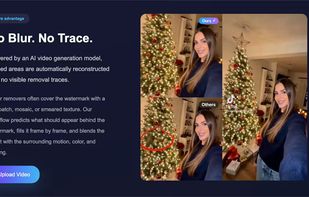
Unlike basic tools that blur or crop the area, RemoveAnything uses AI reconstruction to rebuild the hidden background for a cleaner and more natural result.

Key Features

  • AI watermark removal
  • Remove subtitles from video
  • Remove logos and text overlays
  • Remove mosaic and censor blocks
  • Remove people and unwanted objects
  • Fast upload-to-result workflow

How It Works

  1. Upload a short video
  2. Select what you want to remove
  3. Start the AI cleanup process
  4. Preview and download the result

Who It's For

RemoveAnything is useful for:

  • Content creators repurposing short videos
  • Marketers cleaning branded assets
  • Editors removing baked-in text before localization
  • Teams improving video quality before publishing

RemoveAnything is intended for videos/images you own or are authorized to edit.