
Retromac icon
Retromac icon

Retromac

RetroMac is a macOS menu bar app that transforms your Mac into a fully customizable retro computer, with live CRT shaders and era-specific desktop themes.
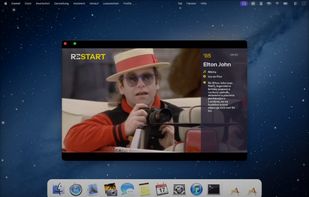
Retromac screenshot 1

Cost / License

  • Freemium (Pay once)
  • Open Source

Platforms

  • Mac
0likes
0comments
0articles

Features

No features, maybe you want to suggest one?

Retromac News & Activities

Highlights All activities

Recent activities

Retromac information

  • Developed by

    DE flagMaik Klotz
  • Licensing

    Open Source and Freemium product.
  • Pricing

    One time purchase (perpetual license) that costs $10 + free version with limited functionality.
  • Written in

  • Alternatives

    2 alternatives listed
  • Supported Languages

    • English

AlternativeTo Category

Office & Productivity

GitHub repository

  •  9 Stars
  •  0 Forks
  •  0 Open Issues
  •   Updated  
View on GitHub

Popular alternatives

View all
Retromac was added to AlternativeTo by klotzbrocken on and this page was last updated .
No comments or reviews, maybe you want to be first?

What is Retromac?

RetroMac is a macOS menu bar app for anyone who loves the look and feel of old computers but wants to keep the power and comfort of a modern Mac. It sits quietly in your menu bar and lets you flip your whole desktop into a believable retro machine in seconds.

The first pillar is a real-time CRT/retro shader overlay that sits on top of your screen or individual windows while remaining click-through, so you can keep using apps as normal. You can dial in CRT curvature, scanlines, NTSC bleed, VHS softness, bloom, vignette and more, and switch between many curated presets ranging from clean PVM to broken VHS tape.

The second pillar is a flexible theme system based on RetroMac theme bundles (.retromactheme). A theme can define a floating, era-accurate dock, matching wallpapers and icons, and even an optional “virtual desktop” for a specific era. You can jump between Snow Leopard, classic Mac OS 9, Windows XP, Windows 3.1/98, BeOS, OS/2, SGI IRIX, Amiga and custom favourites with a single click, without touching your real macOS setup.

On top of that, RetroMac includes a virtual camera that applies the same shaders to your webcam feed for calls and streaming, a “Television” mode that displays web pages or video streams inside a retro screen with all effects applied, and quick access to classic games like Quake, Doom or emulators so you can complete the illusion. You can capture screenshots with all shaders applied, making it easy to share your perfect retro setup.

Whether you want a nostalgic workstation, a retro-styled streaming setup, or just a fun way to change how your Mac feels, RetroMac gives you a complete toolkit for living in the past without leaving macOS behind.

Official Links

